
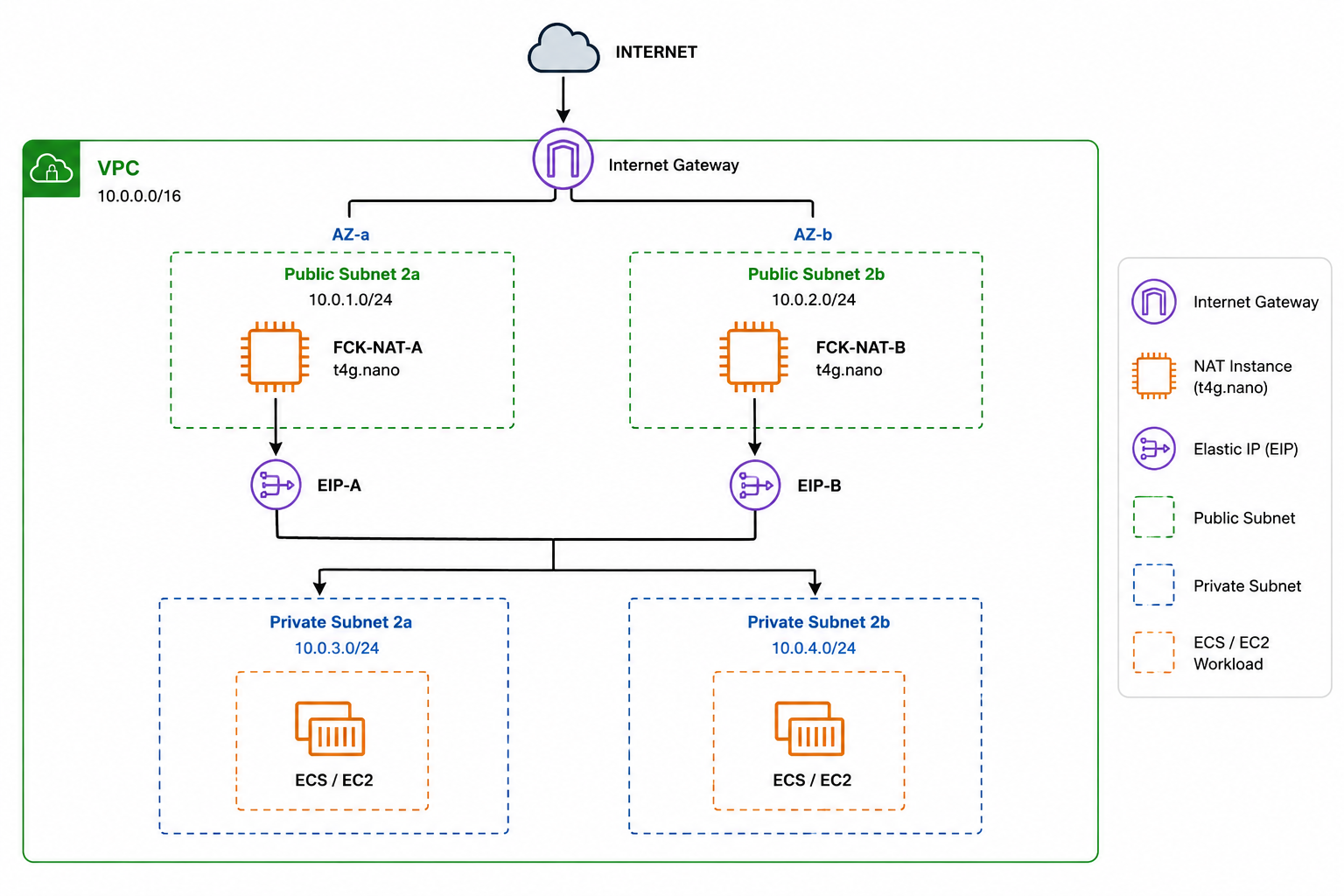
How I replaced a managed NAT Gateway with lightweight ARM-based EC2 NAT instances, Elastic IPs, ENIs, and AZ-specific routing — while keeping private workloads connected to the internet.
Introduction
The Problem: Internet Access from Private Subnets
“Our application was running in private subnets, but it still needed outbound internet access. The obvious solution was an AWS NAT Gateway—but the cost made us look for an alternative.
While designing an AWS VPC for an application running on ECS/EC2, I needed private subnets to access external services such as Amazon ECR, SSM, package repositories and external APIs.
The traditional solution is an AWS NAT Gateway. It works extremely well, but for a small environment it can introduce a significant fixed hourly and data-processing cost.
I wanted to explore whether I could achieve the same basic outbound-NAT functionality using a much cheaper EC2-based solution.
It’s an EC2-based NAT solution that can provide NAT functionality while using a small EC2 instance instead of the managed NAT Gateway. The project also supports HA configurations, static Elastic IPs, and persistent ENIs.
2.1 Why Keep Applications in Private Subnets?
A common AWS architecture is to place application workloads inside private subnets rather than directly exposing them to the internet.
For example, an ECS service running on EC2 instances may contain application containers that should not be directly reachable from the public internet. Instead, incoming traffic can be handled by a public-facing Application Load Balancer, while the actual application servers remain inside private subnets.
This provides an additional layer of security because the application instances do not need public IP addresses or direct inbound internet access.
A simplified architecture looks like this:
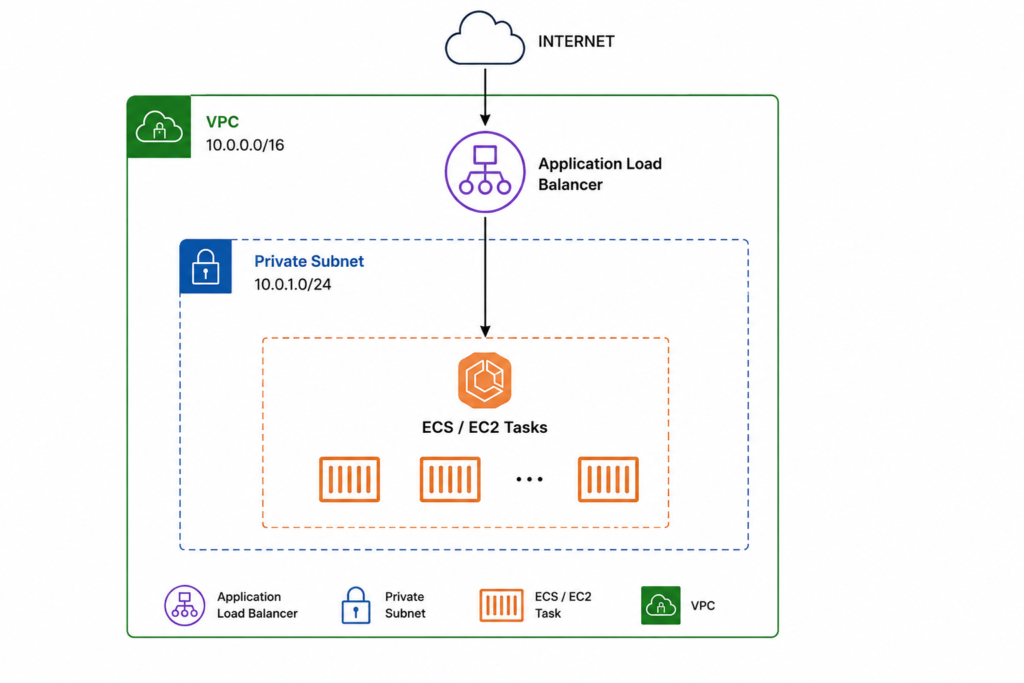
Keeping workloads private is especially useful for applications that process sensitive data, databases, internal APIs, or backend services.
However, keeping a server in a private subnet does not mean that it should be completely isolated from the internet.
In many real-world environments, private workloads still need to make outbound connections to external services.
2.2 Why Do Private Subnets Need Internet Access?
Even though the application servers are private, they may still need to communicate with services outside the VPC.
For example, an application running on an EC2 instance or ECS task may need to:
- Pull container images from Amazon ECR
- Connect to AWS Systems Manager (SSM)
- Download operating system or package updates
- Access external APIs
- Download dependencies during application deployment
- Communicate with third-party services
- Send requests to external SaaS platforms
The important distinction here is that the application needs outbound internet access, not necessarily inbound internet access.
For example:
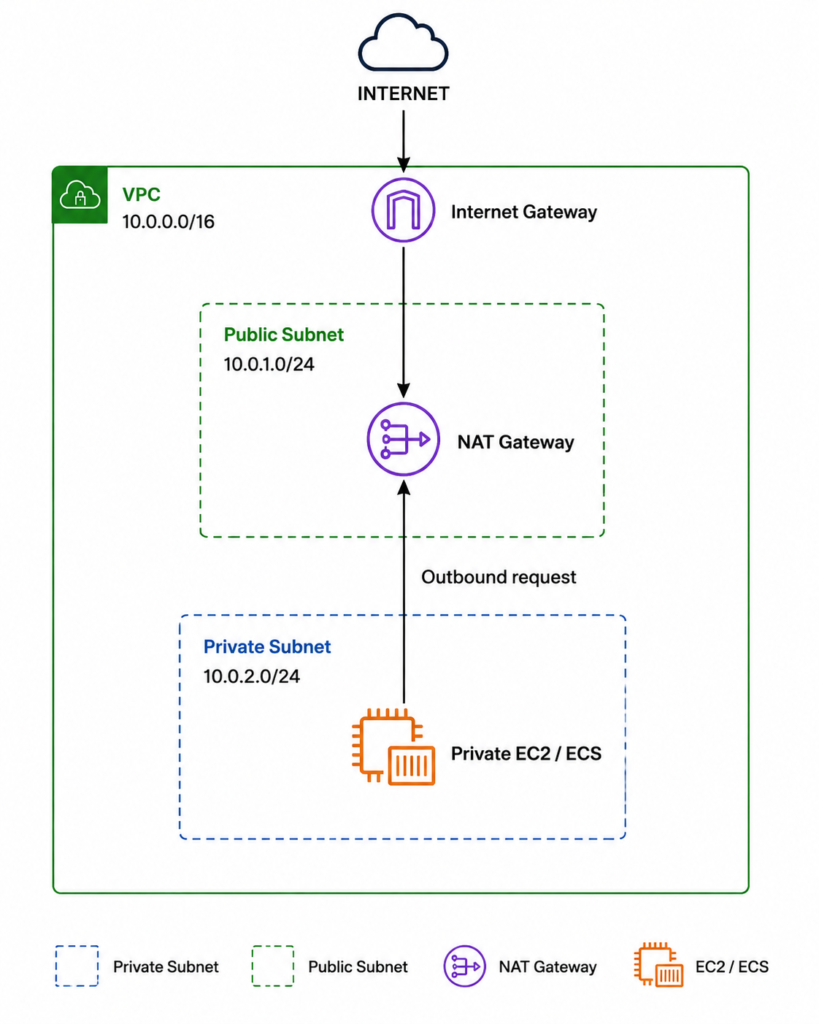
The private instance initiates the connection, and the NAT device allows that connection to reach the internet while keeping the private instance itself unreachable from unsolicited inbound internet traffic.
This creates a useful security model:
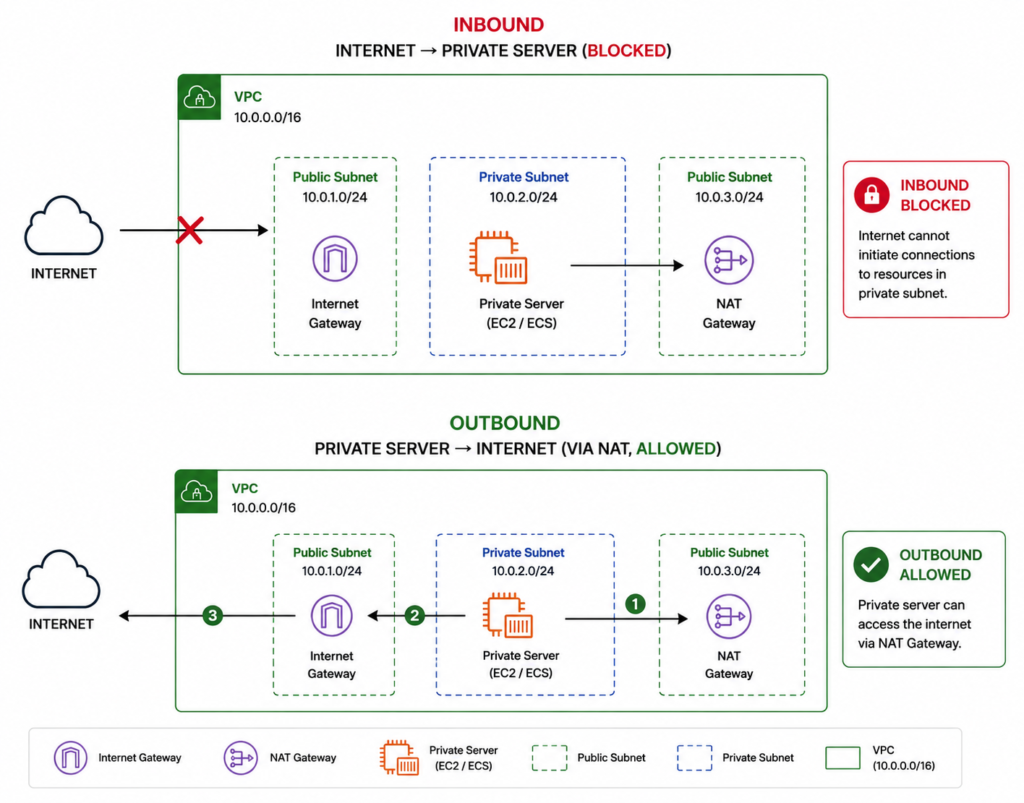
This is where NAT becomes an important component of a private-subnet architecture.
2.3 The Traditional Solution: AWS NAT Gateway
The standard AWS solution for providing internet access to resources in private subnets is an AWS NAT Gateway.
A NAT Gateway is deployed in a public subnet. Private subnet route tables then send internet-bound traffic to the NAT Gateway, which forwards the traffic through the VPC’s Internet Gateway.
The traffic flow looks like this:
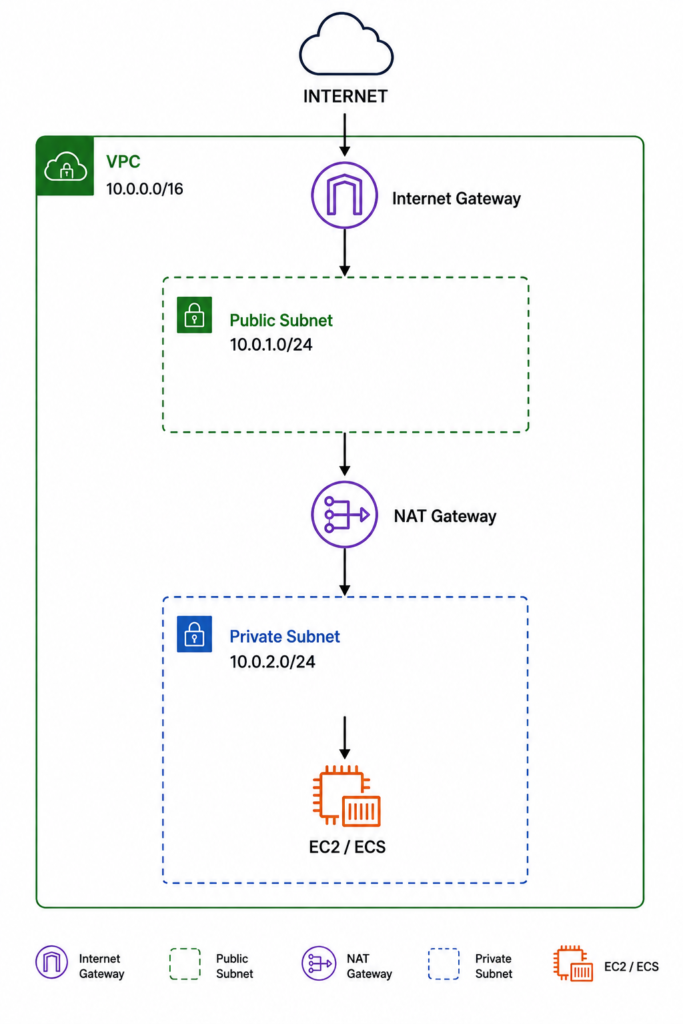
The private subnet does not have a direct route to the Internet Gateway. Instead, its default route points to the NAT Gateway.
For example:
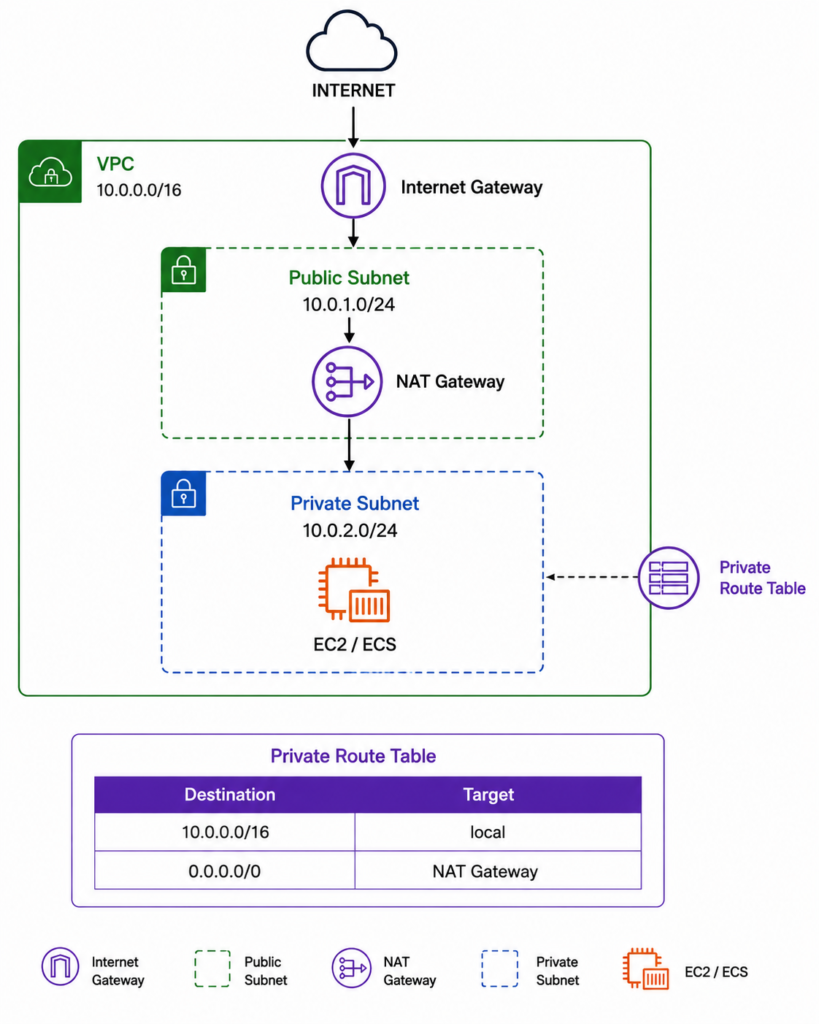
When an application sends a request to an external service, the request follows this route:
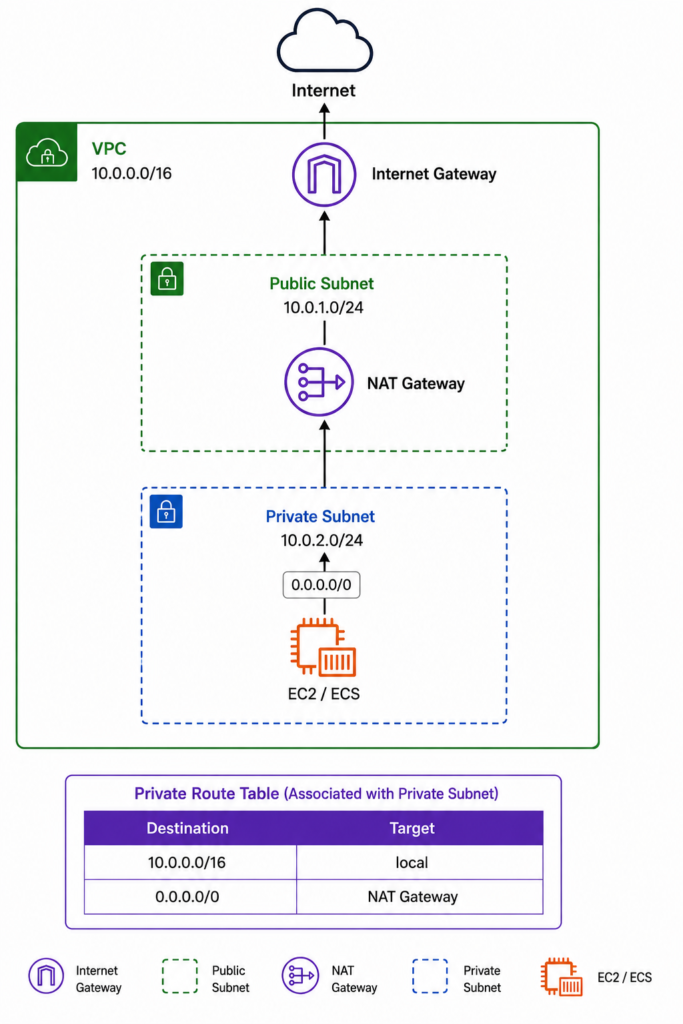
AWS NAT Gateway is a managed service, so AWS handles the underlying infrastructure, scaling, availability, and maintenance. This makes it a very convenient option for production architectures.
However, there is a trade-off: cost.
NAT Gateway pricing includes an hourly charge as well as a data-processing charge based on the amount of data processed through the gateway. For environments with significant outbound traffic, these costs can become noticeable.
For a small development, staging, or low-traffic production environment, I wanted to investigate whether the same basic NAT functionality could be achieved at a lower cost.
That led me to fck-nat.
2.4 Why I Chose fck-nat Instead of NAT Gateway
AWS NAT Gateway is a reliable and fully managed solution, but for this project the main concern was cost.
The environment did not require the scale of a large production workload. I was working with a relatively small VPC where the main requirement was simple:
Private workloads should be able to make outbound internet connections without assigning public IP addresses to those workloads.
Instead of paying for a managed NAT Gateway, I looked at using an EC2-based NAT solution.
This is where fck-nat fits in.
fck-nat is an open-source NAT solution designed to run on an EC2 instance. The EC2 instance performs the NAT function and forwards traffic from private subnets to the internet.
The architecture becomes:
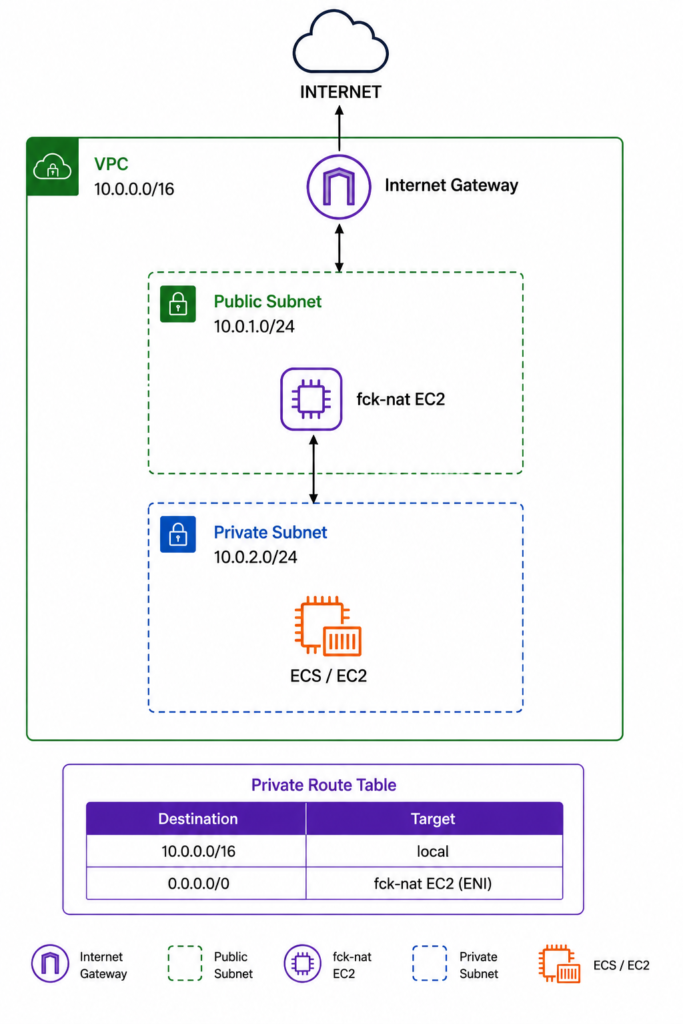
The main advantage is that I can use a small EC2 instance instead of an AWS-managed NAT Gateway.
For this architecture, I chose an ARM-based EC2 instance because the workload is lightweight and the ARM instance family provides a cost-effective option for running the NAT software.
However, using fck-nat also means that I am responsible for the EC2-based NAT infrastructure. Unlike NAT Gateway, this is not a fully managed AWS service.
That means I need to consider:
- EC2 instance availability
- Elastic IP configuration
- Network interfaces
- Route tables
- Availability Zones
- Failover
- Instance monitoring
- Security groups
- Maintenance and updates
So the decision was not simply about replacing one resource with another.
It was about accepting a little more infrastructure management in exchange for significantly lower NAT costs for a small environment.
2.5 Architecture Overview
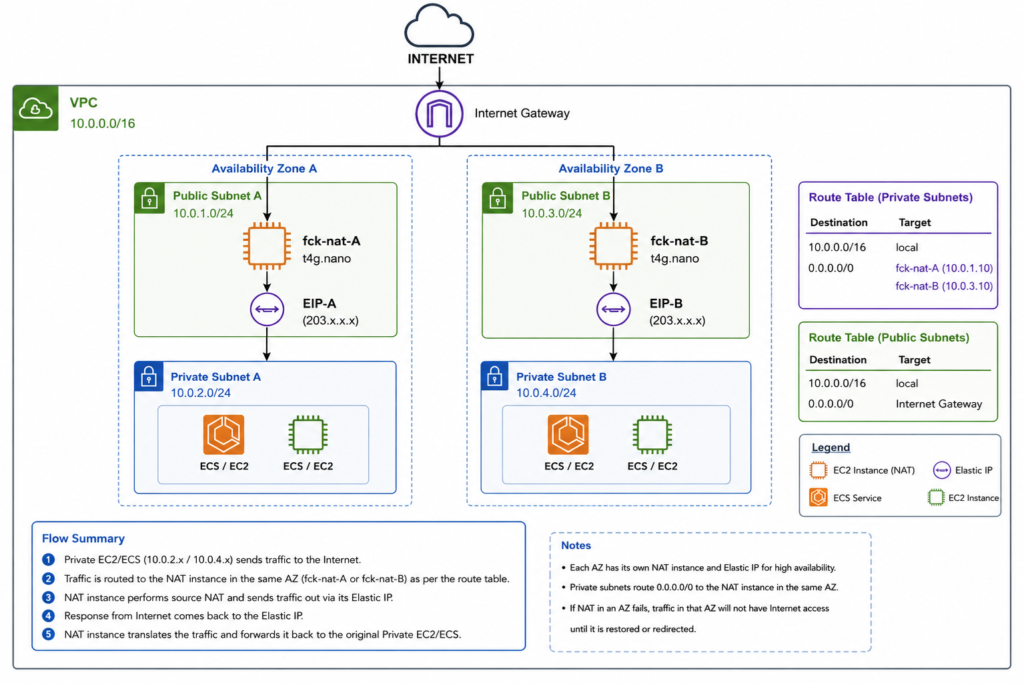
The final architecture uses two Availability Zones, with a dedicated fck-nat EC2 instance in each public subnet.
Private subnets in each Availability Zone route their internet-bound traffic through the NAT instance in the same Availability Zone.
The architecture looks like this:
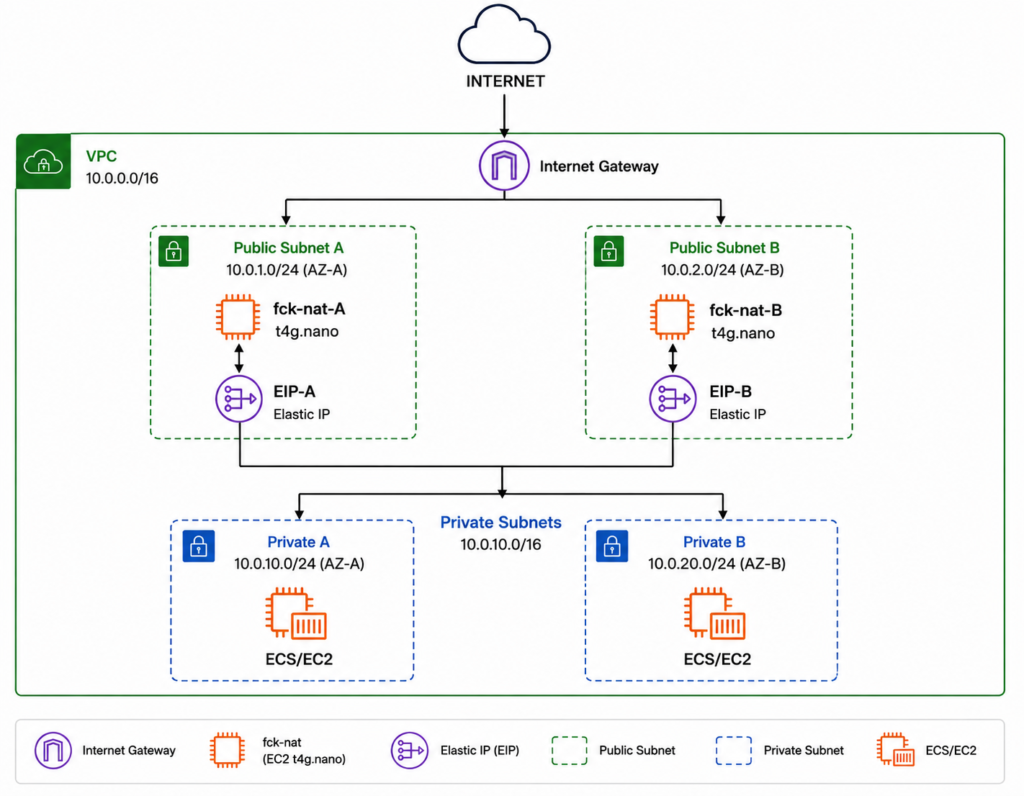
Each NAT instance is associated with its own Elastic IP address.
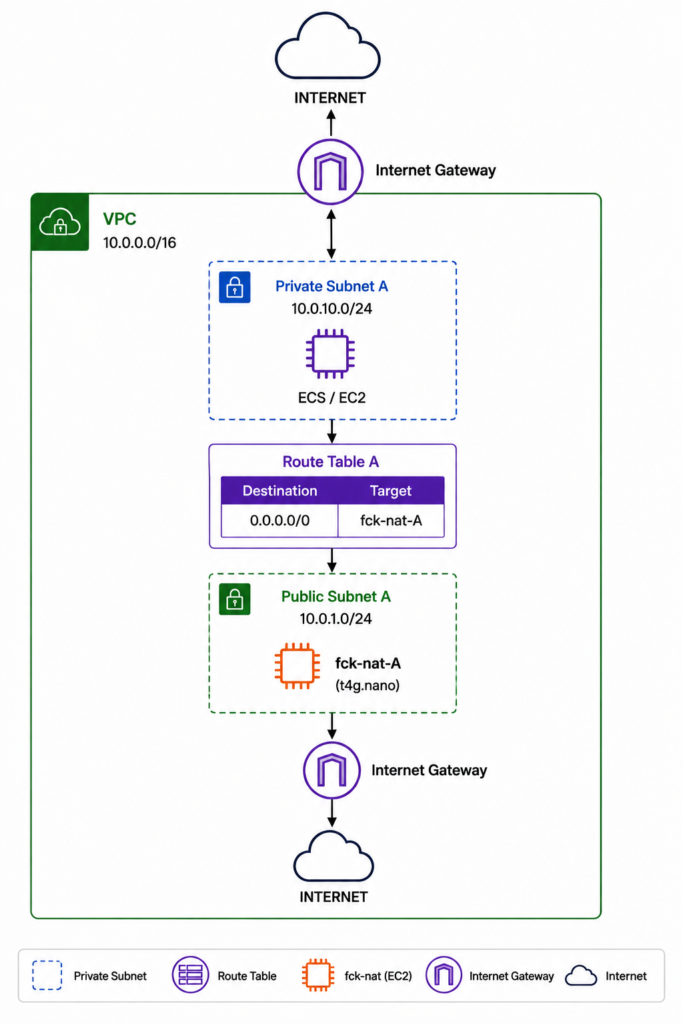
The important part of this architecture is the Availability Zone-specific routing.
Private subnet A uses fck-nat-A:
Similarly, private subnet B uses fck-nat-B:
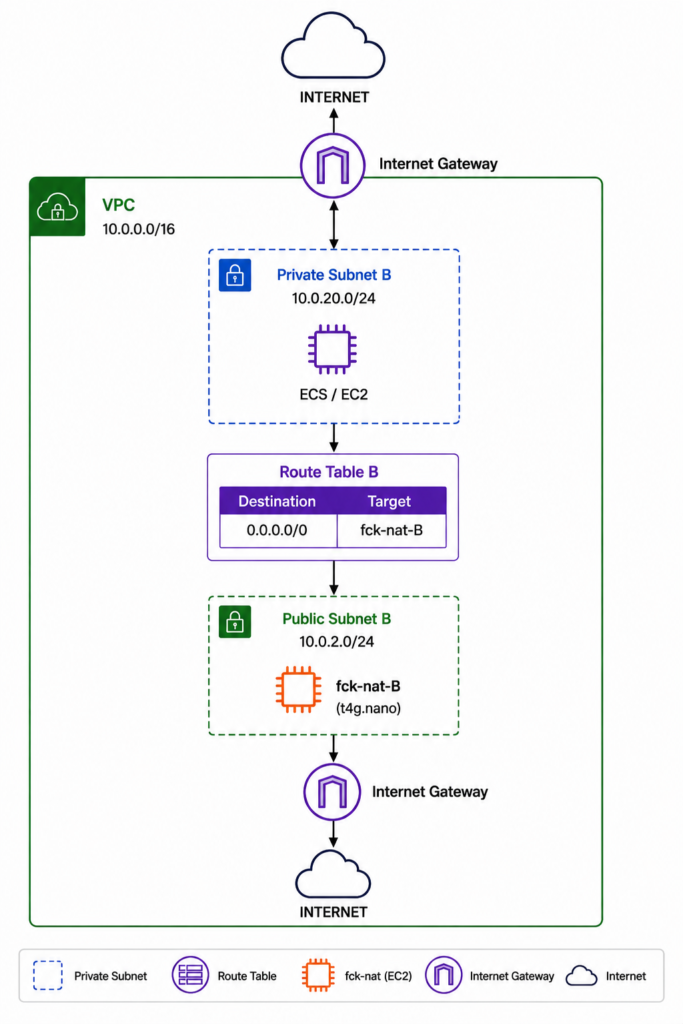
This avoids unnecessarily sending traffic from one Availability Zone to another just to reach the NAT instance.
It also provides a basic level of redundancy. If one NAT instance or Availability Zone has a problem, the other Availability Zone still has its own NAT instance.
The next step is to understand how each component fits together and why each one is required.
3. Understanding AWS NAT Gateway
Before looking at the fck-nat implementation, it is important to understand how the standard AWS NAT Gateway works.
A NAT Gateway is a managed AWS service that allows resources in a private subnet to establish outbound connections to the internet without requiring those resources to have public IP addresses.
It is normally deployed in a public subnet and is accessed by resources in one or more private subnets through their route tables.
A typical architecture looks like this:
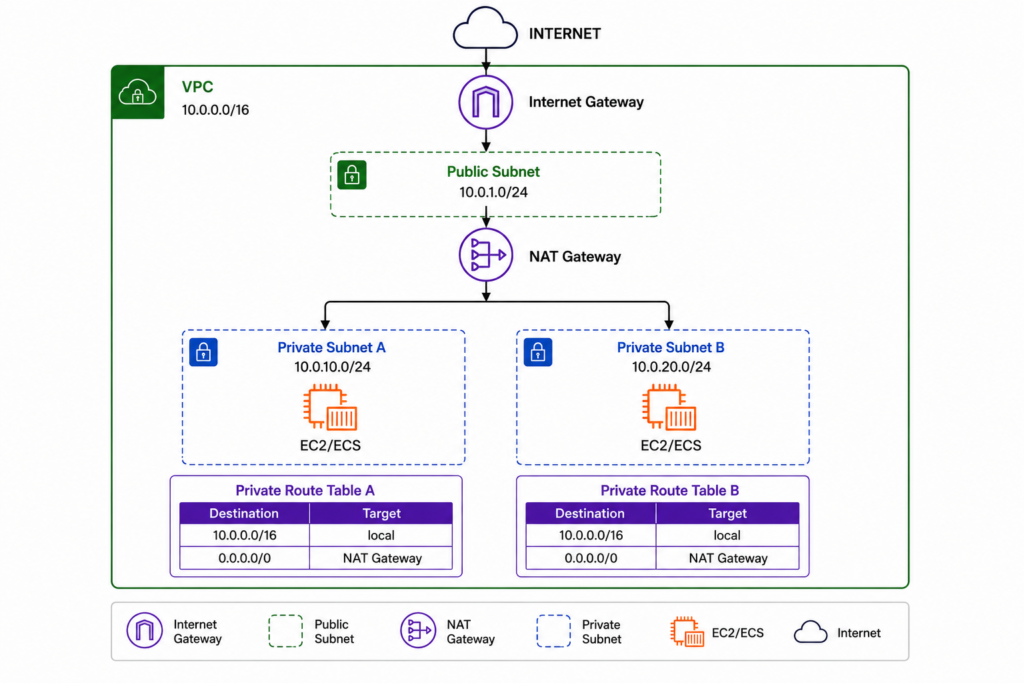
The important point is that the NAT Gateway itself is placed in a public subnet, while the workloads that use it remain in private subnets.
3.1 How NAT Gateway Works
A NAT Gateway acts as an intermediary between private resources and the internet.
When an EC2 instance or ECS workload in a private subnet needs to access an external service, it sends the traffic to the NAT Gateway.
The private workload does not need a public IPv4 address.
Instead, the NAT Gateway uses its public connectivity to communicate with the internet on behalf of the private resource.
For example, a private EC2 instance might have an address such as:
10.0.2.10
When it sends a request to an external service, the request is routed to the NAT Gateway.
The NAT Gateway then performs network address translation so that the external service sees the NAT Gateway’s public IP address rather than the private IP address of the EC2 instance.
Conceptually:
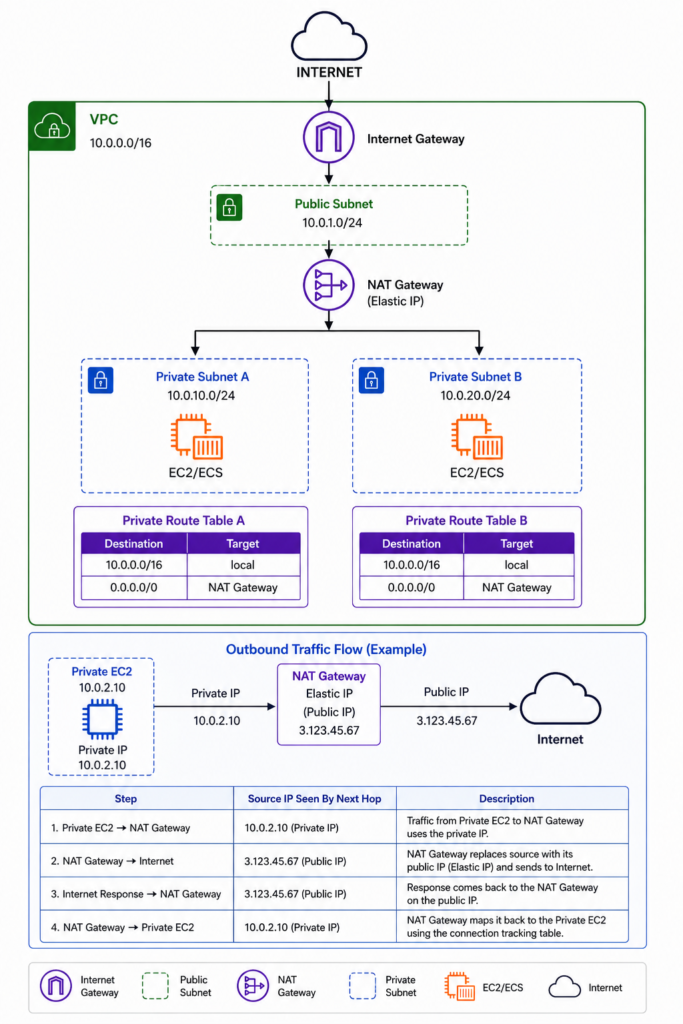
The response follows the reverse path, allowing the NAT Gateway to maintain the connection back to the private workload.
This allows private resources to initiate outbound connections while remaining inaccessible from unsolicited inbound internet traffic.
3.2 Traffic Flow Through NAT Gateway
The traffic flow is controlled primarily by the route tables associated with the private subnets.
For example, a private subnet might have the following route:
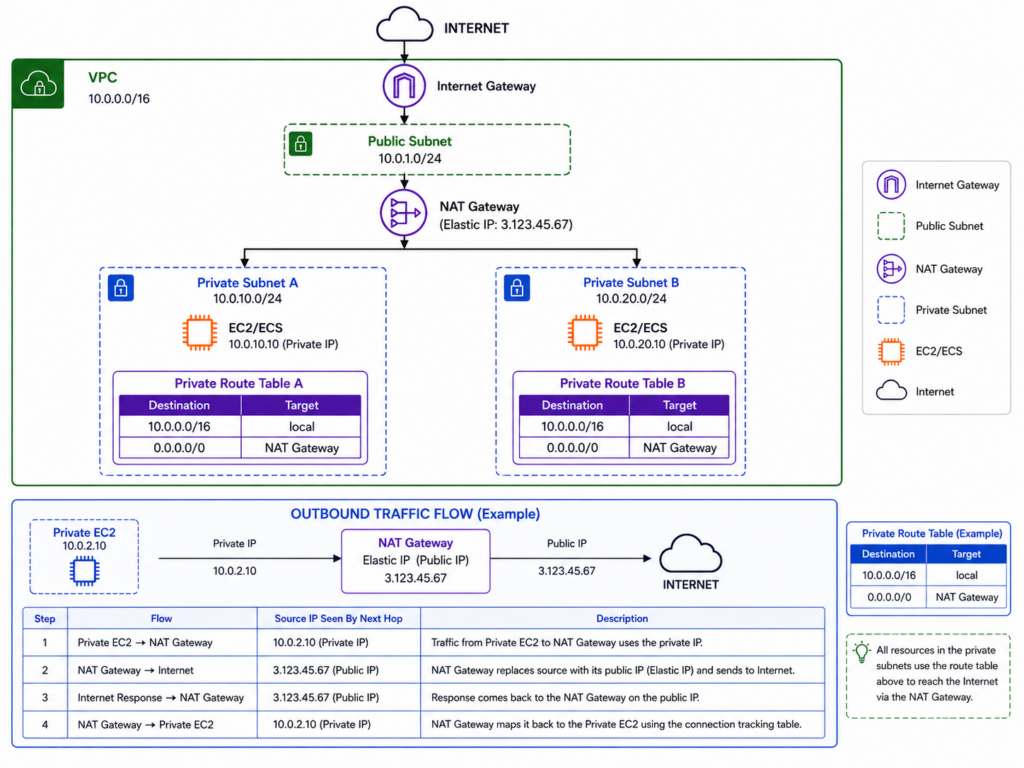
The 0.0.0.0/0 route means that traffic destined for addresses outside the VPC should be sent to the NAT Gateway.
The complete traffic flow is:
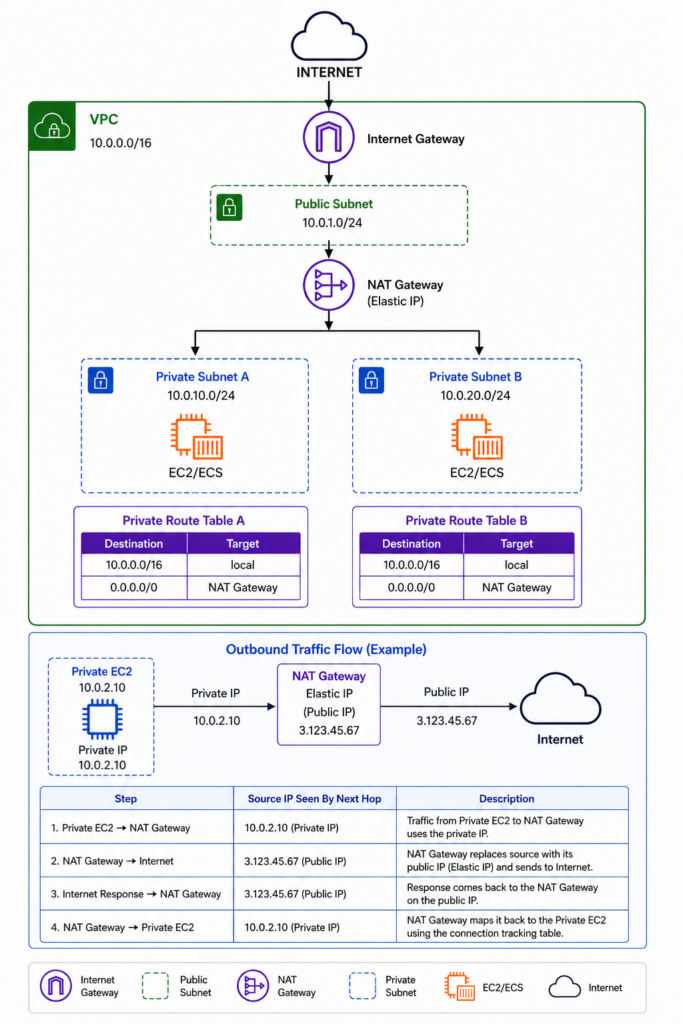
For example, suppose an application running on a private EC2 instance needs to download a package from an external repository.
The process is approximately:
- The application creates an outbound connection.
- The private subnet’s route table sends the traffic to the NAT Gateway.
- The NAT Gateway translates the private source address.
- The traffic is sent through the Internet Gateway.
- The external service receives the request.
- The response returns through the Internet Gateway.
- The NAT Gateway translates the response back to the private workload.
- The EC2 instance receives the response.
The private EC2 instance therefore does not require its own public IP address.
For a highly available architecture, AWS recommends deploying NAT Gateways in multiple Availability Zones and routing each private subnet through a NAT Gateway in the same Availability Zone.
This is important because using a single NAT Gateway for multiple Availability Zones can introduce cross-AZ traffic and create a dependency on a single NAT Gateway.
3.3 NAT Gateway Pricing and Cost Considerations
The main reason I considered an alternative to NAT Gateway was cost.
AWS NAT Gateway pricing generally has two important components:
- Hourly NAT Gateway charges
- Data processing charges
The hourly charge is incurred while the NAT Gateway is provisioned.
In addition, AWS charges for each GB of data processed through the NAT Gateway.
This means the total cost can increase as the amount of outbound traffic increases.
For example:
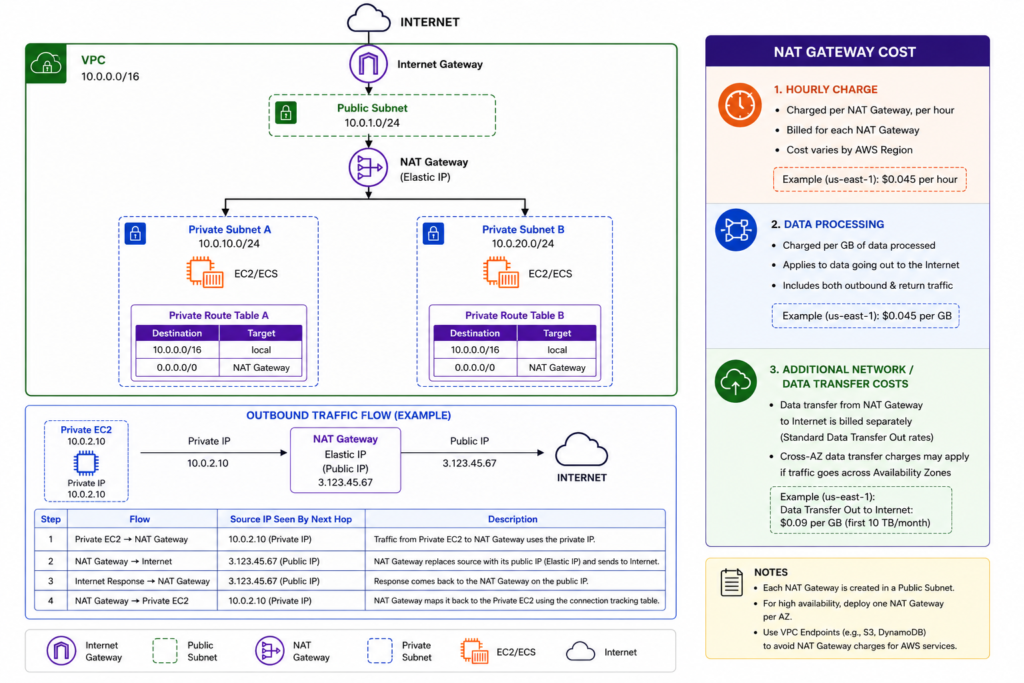
For a small environment, the hourly cost can be significant compared with the actual compute resources being used by the application.
The cost becomes even more important when designing for multiple Availability Zones.
For example:
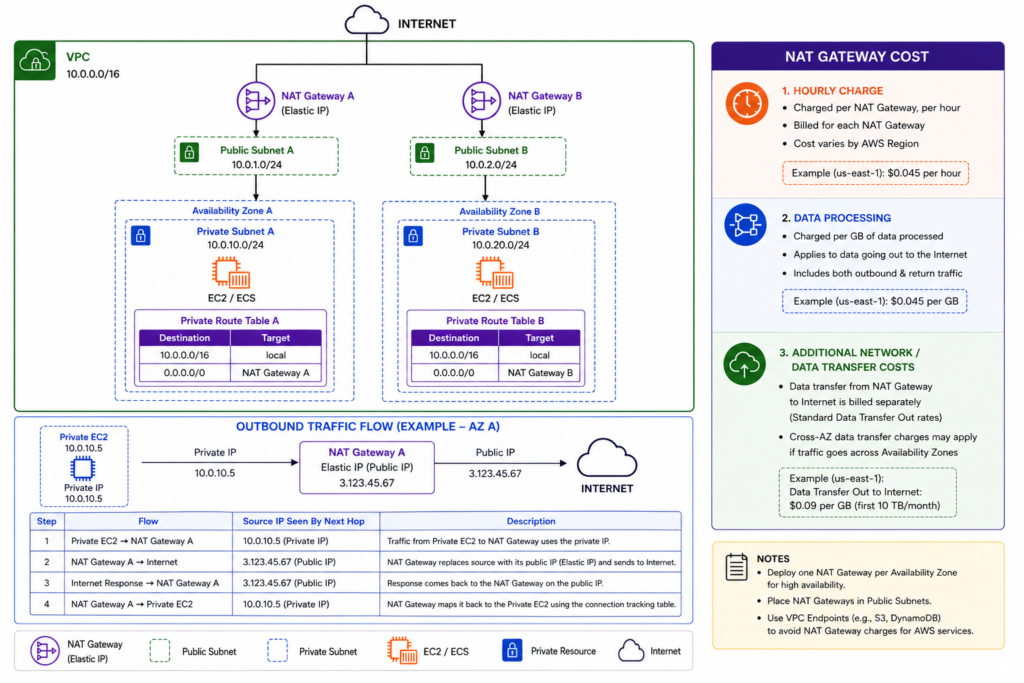
Using separate NAT Gateways per Availability Zone improves availability and avoids unnecessary cross-AZ routing, but it also means paying for multiple NAT Gateways.
For a large production workload, the operational simplicity and managed nature of NAT Gateway can justify this cost.
For a smaller environment, however, it raises an important question:
Do we really need a fully managed NAT Gateway, or can we achieve the same basic outbound connectivity using a much cheaper EC2-based solution?
That is the question that led me to explore fck-nat.
4. Looking for a Cost-Effective Alternative
After understanding how AWS NAT Gateway works and where the cost comes from, the next question was whether there was a more economical way to provide the same basic outbound connectivity for a small AWS environment.
The requirement was straightforward:
- Keep application workloads in private subnets.
- Allow those workloads to access the internet when required.
- Avoid assigning public IP addresses to private workloads.
- Maintain static public IP addresses where required.
- Support multiple Availability Zones.
- Keep the infrastructure simple enough to operate.
- Reduce the recurring cost of NAT.
This led to the evaluation of fck-nat, an EC2-based NAT solution.
4.1 Why We Considered FCK-NAT
The main reason for considering fck-nat was cost.
An AWS NAT Gateway is a managed service, which means AWS handles the underlying infrastructure and availability. However, that convenience comes with ongoing hourly and data-processing charges.
For a smaller environment with relatively low traffic, running a lightweight EC2 instance can be considerably more economical.
The idea was to replace this:
Private Subnet
      |
      v
NAT Gateway
      |
      v
Internet
with an EC2-based NAT solution:
Private Subnet
      |
      v
fck-nat EC2
      |
      v
Internet
The EC2 instance performs the NAT function and provides the private subnet with a path to the internet.
Another advantage is the flexibility available with EC2-based infrastructure. We can choose the instance size and architecture based on the expected workload.
For this setup, an ARM-based instance such as t4g.nano is suitable for a lightweight NAT workload, helping keep compute costs low.
However, the lower cost comes with additional responsibility.
With NAT Gateway, AWS manages the underlying service. With fck-nat, we are responsible for the EC2 instances, networking configuration, routing, monitoring, and availability strategy.
So the decision is essentially a trade-off:
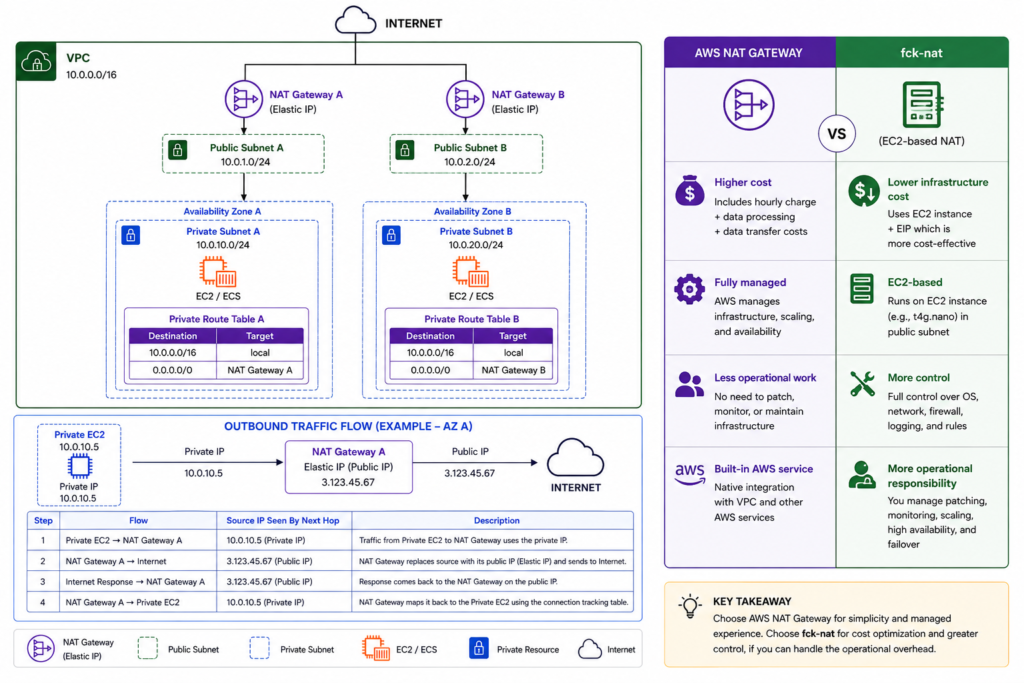
For this project, the lower cost and additional control made fck-nat worth evaluating.
4.2 What Is FCK-NAT?
fck-nat is an open-source NAT solution designed to provide NAT functionality using an EC2 instance.
Instead of using AWS’s managed NAT Gateway service, fck-nat runs on an EC2 instance inside a public subnet.
Private subnet route tables then send internet-bound traffic to the fck-nat instance.
The basic architecture is:
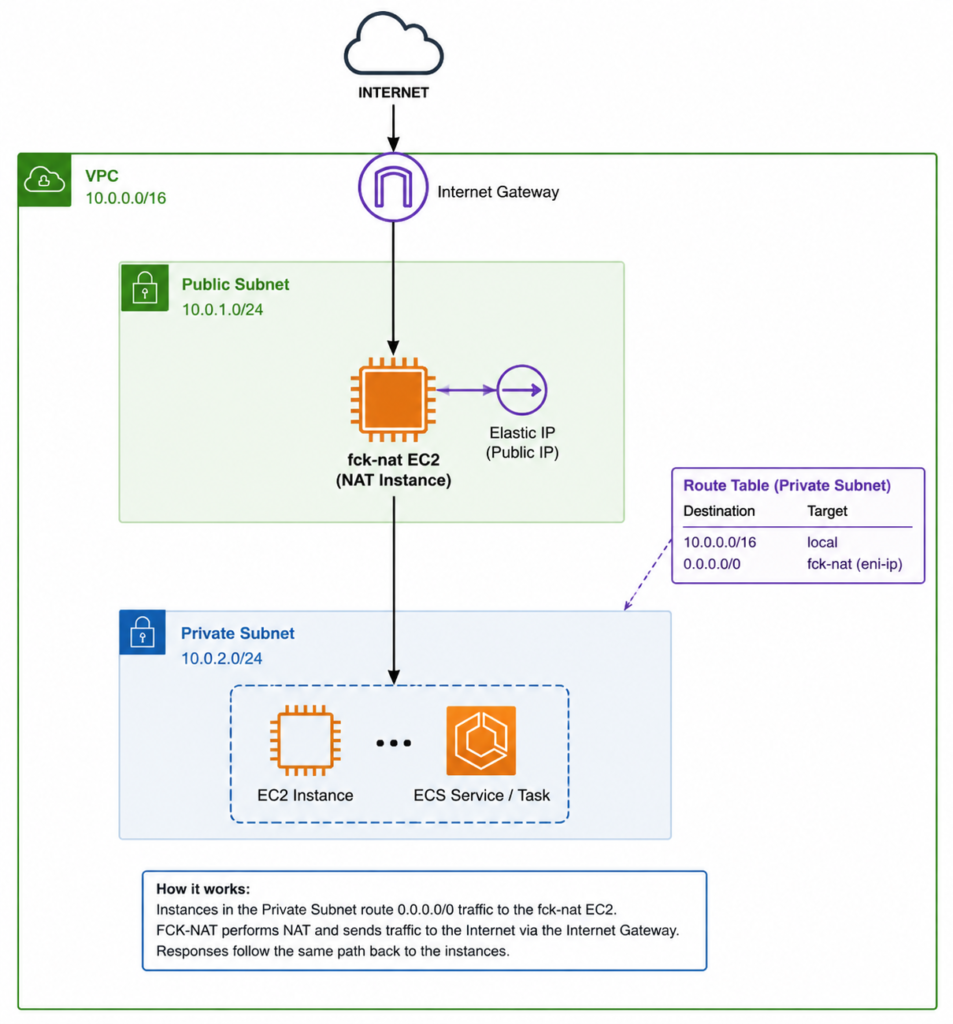
The fck-nat instance acts as the NAT layer between the private workloads and the internet.
The private workloads remain without public IP addresses. When they need to access an external service, their traffic is routed through the fck-nat instance.
fck-nat can also be used with Elastic IP addresses, allowing outbound traffic to originate from a known public IP.
This can be useful when an external service requires IP allowlisting.
For example:
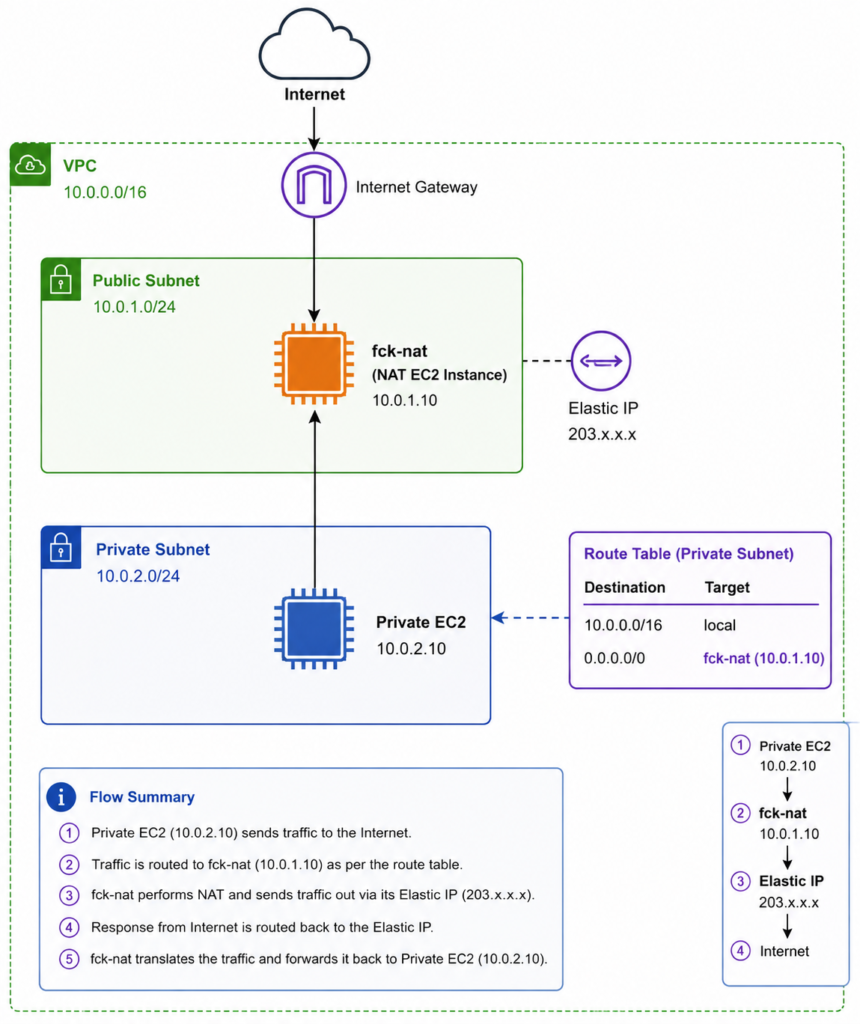
From the external service’s perspective, the connection originates from the Elastic IP rather than the private IP of the application server.
For higher availability, multiple fck-nat instances can be deployed across Availability Zones.
In this project, the architecture uses one fck-nat instance per Availability Zone:
This keeps the NAT path local to each Availability Zone and provides redundancy if one NAT instance becomes unavailable.
4.3 FCK-NAT vs AWS NAT Gateway
Both solutions provide the same fundamental capability: allowing private resources to establish outbound internet connections without assigning public IP addresses to those resources.
The major difference is who manages the NAT infrastructure.
| Feature | AWS NAT Gateway | fck-nat |
|---|---|---|
| Type | Managed AWS service | EC2-based NAT |
| Infrastructure | Managed by AWS | Managed by you |
| Compute | Dedicated managed service | EC2 instance |
| Public IP | Elastic IP | Elastic IP |
| Private subnet support | Yes | Yes |
| Outbound internet access | Yes | Yes |
| Multi-AZ architecture | Yes | Yes, using multiple instances |
| Scaling | Managed by AWS | Instance-based |
| Maintenance | AWS managed | User managed |
| Cost model | Hourly + data processing | EC2 + EIP + networking costs |
| Operational effort | Low | Higher |
| Customization | Limited | More control |
The important thing is that fck-nat is not a direct replacement in terms of operational responsibility.
With NAT Gateway, AWS provides a managed service and handles the underlying infrastructure.
With fck-nat, we are effectively building and operating our own NAT layer using EC2.
That means we need to take care of things such as:
- EC2 instance health
- Route table configuration
- Elastic IPs
- Network interfaces
- Availability Zones
- Security groups
- Monitoring
- Failover
- Instance updates
For a large environment where minimizing operational overhead is the priority, AWS NAT Gateway may still be the better choice.
For a smaller environment where NAT traffic is relatively low and cost is an important consideration, fck-nat can provide a compelling alternative.
In this project, the goal was therefore not to claim that fck-nat is universally better than NAT Gateway.
The goal was to determine whether an EC2-based NAT architecture could provide the required connectivity at a significantly lower cost while still maintaining a sensible level of availability.
The next section walks through the actual AWS architecture and shows how the fck-nat instances, Elastic IPs, ENIs, public subnets, private subnets, and route tables work together.
5. Architecture
Now that we have looked at the problem, the limitations of NAT Gateway, and why fck-nat was considered as an alternative, it is time to look at the architecture that was actually implemented.
The design uses a VPC with separate public and private subnets across two Availability Zones.
The main components are:
- AWS VPC
- Internet Gateway
- Two public subnets
- Two private subnets
- Two fck-nat EC2 instances
- Two Elastic IP addresses
- Separate route tables for the private subnets
- ECS/EC2 workloads running in the private subnets
The important design principle is that the application workloads remain private, while the fck-nat instances provide controlled outbound internet access.
5.1 Our AWS VPC Architecture
The VPC uses a /16 CIDR range, providing a large private address space for the different subnets and future expansion.
The architecture is distributed across two Availability Zones to avoid depending on a single Availability Zone.
The overall design looks like this:
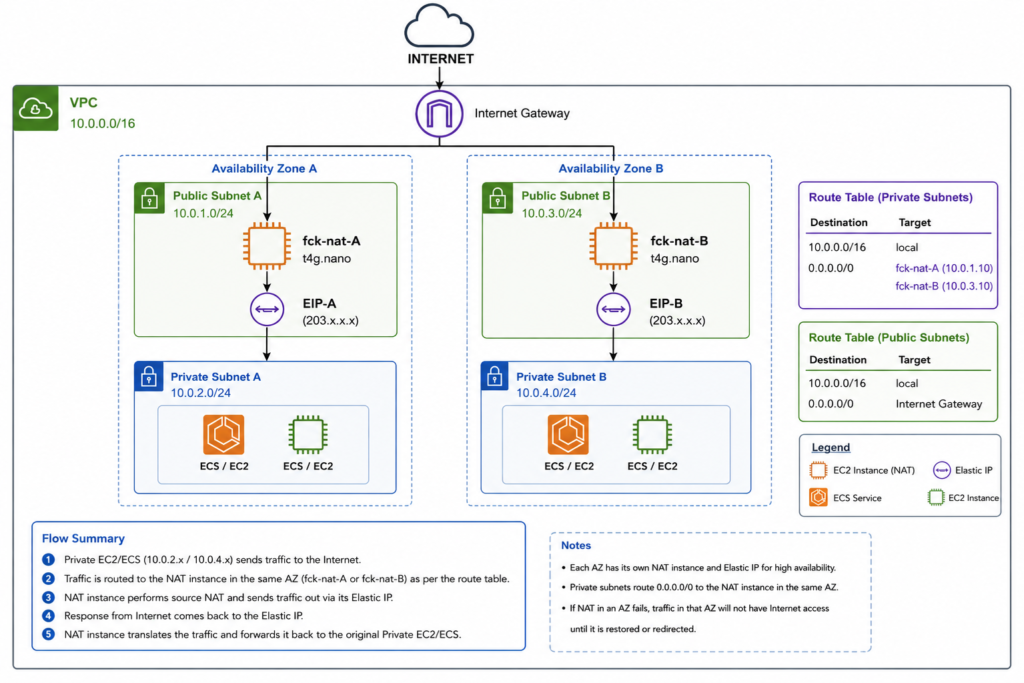
Each Availability Zone has its own NAT instance.
This provides two important benefits.
First, private workloads have a local NAT path within their own Availability Zone.
Second, the architecture does not depend entirely on a single NAT instance.
If one Availability Zone has a problem, workloads in the other Availability Zone can continue using their own NAT instance.
The architecture can be summarized as:
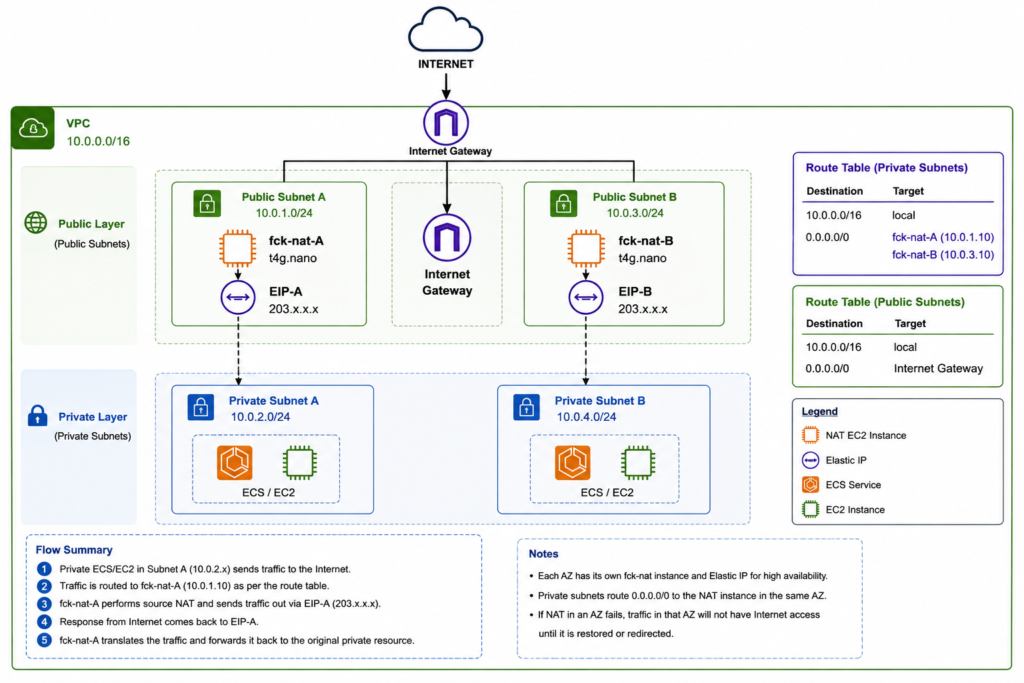
The public layer is responsible for providing internet connectivity to the NAT instances, while the private layer contains the application workloads.
5.2 Public and Private Subnets
The VPC is divided into public and private subnets.
The main difference between them is their routing.
A public subnet has a route to the Internet Gateway. This allows resources with appropriate public addressing to communicate with the internet.
A private subnet does not have a direct route to the Internet Gateway.
Instead, internet-bound traffic from the private subnet is sent to the fck-nat instance.
The architecture therefore separates the workloads from the public internet:
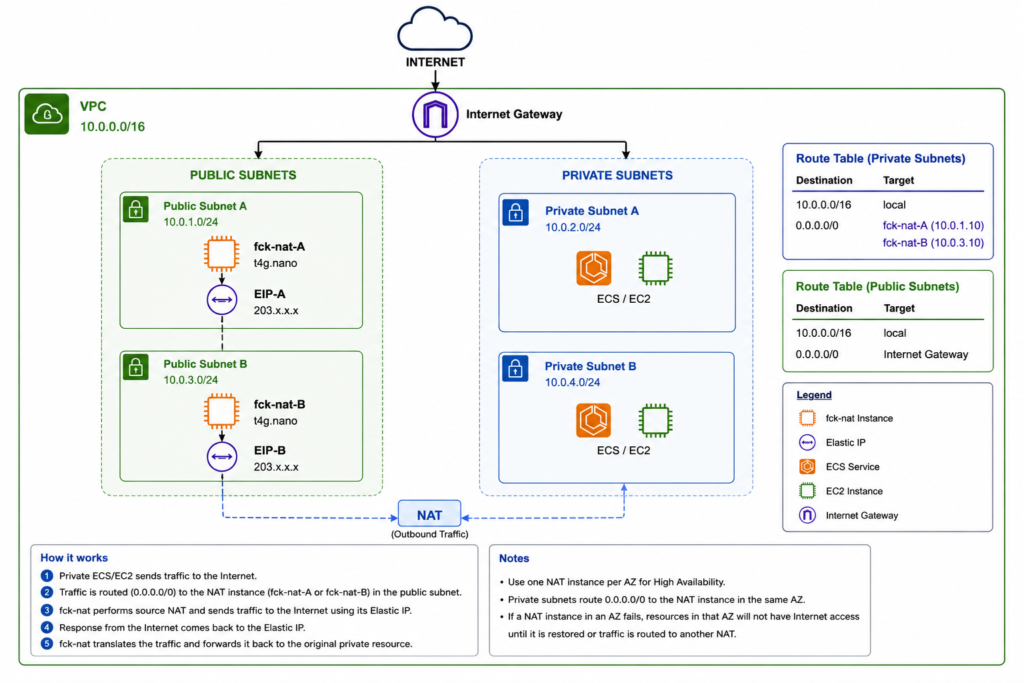
For example, the subnet layout can be represented as:
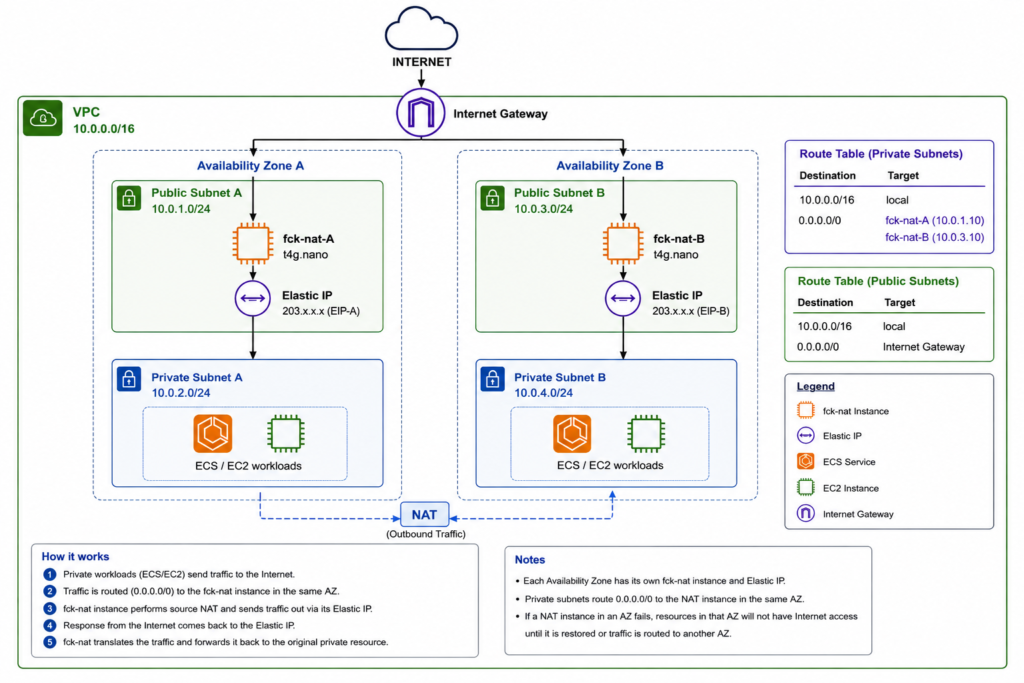
The application workloads in the private subnets do not need public IP addresses.
This is one of the main security advantages of the design.
5.3 Internet Gateway
The Internet Gateway (IGW) provides the connection between the VPC and the public internet.
It is attached to the VPC and is used by resources in public subnets that need internet connectivity.
In this architecture, the fck-nat instances are placed in the public subnets.
The Internet Gateway therefore provides the internet-facing path for the NAT instances:
                    INTERNET
                        |
                        |
                Internet Gateway
                        |
              +---------+---------+
              |                   |
        Public Subnet A     Public Subnet B
              |                   |
          fck-nat-A          fck-nat-B
The important point is that the private application workloads are not directly connected to the Internet Gateway.
Their route to the internet goes through fck-nat.
Private EC2 / ECS
        |
        v
    fck-nat
        |
        v
Internet Gateway
        |
        v
     Internet
The Internet Gateway therefore acts as the boundary between the VPC’s public-facing networking components and the internet.
5.4 FCK-NAT Instances
The core component of this architecture is the fck-nat EC2 instance.
Instead of using an AWS-managed NAT Gateway, an EC2 instance is configured to perform the NAT function.
In this implementation, a lightweight ARM-based t4g.nano instance is used for each Availability Zone.
The instances are placed in the public subnets:
Public Subnet A              Public Subnet B
      |                            |
  fck-nat-A                    fck-nat-B
  t4g.nano                     t4g.nano
      |                            |
    EIP-A                        EIP-B
Each instance has an Elastic IP associated with it.
This gives each NAT instance a stable public IPv4 address.
That can be useful when external services require a fixed source IP to be allowlisted.
For example:
Private Application
       |
       v
  fck-nat-A
       |
       v
     EIP-A
       |
       v
External API
The external API sees the connection coming from the Elastic IP rather than from the private IP address of the application.
The two-instance design also follows an Availability Zone-specific model.
Private Subnet A uses fck-nat-A, while Private Subnet B uses fck-nat-B.
This keeps the traffic path simple:
Private A ---> fck-nat-A ---> Internet

Private B ---> fck-nat-B ---> Internet
Instead of:
Private A ---> fck-nat-B ---> Internet
which could introduce unnecessary cross-AZ traffic.
5.5 Route Tables and Traffic Flow
Route tables are what connect the private workloads to the fck-nat instances.
Each private subnet has a route table containing a default route:
Destination        Target
-----------        ----------------
10.0.0.0/16        local
0.0.0.0/0          fck-nat-A
for Private Subnet A, and:
Destination        Target
-----------        ----------------
10.0.0.0/16        local
0.0.0.0/0          fck-nat-B
for Private Subnet B.
The 0.0.0.0/0 route means that traffic destined for outside the VPC should be sent to the NAT instance.
The complete traffic flow from Private Subnet A is:
                    INTERNET
                        ^
                        |
                Internet Gateway
                        ^
                        |
                    fck-nat-A
                        ^
                        |
              Private Route Table A
                  0.0.0.0/0
                        ^
                        |
                 ECS / EC2
The same process occurs in Availability Zone B:
                    INTERNET
                        ^
                        |
                Internet Gateway
                        ^
                        |
                    fck-nat-B
                        ^
                        |
              Private Route Table B
                  0.0.0.0/0
                        ^
                        |
                 ECS / EC2
For an outbound request, the process is therefore:
- An application running in the private subnet sends a request to the internet.
- The private subnet’s route table checks the destination.
- Because the destination is outside the VPC, the
0.0.0.0/0route is used. - The traffic is sent to the appropriate fck-nat instance.
- fck-nat performs the NAT operation.
- The traffic exits through the Internet Gateway.
- The external service receives the request.
- The response returns through the same NAT path.
- fck-nat translates the response back to the private workload.
The final traffic path can be summarized as:
             PRIVATE WORKLOAD
                    |
                    | 1. Request
                    v
              PRIVATE ROUTE TABLE
                    |
                    | 2. 0.0.0.0/0
                    v
                 FCK-NAT
                    |
                    | 3. NAT
                    v
             INTERNET GATEWAY
                    |
                    | 4. Public traffic
                    v
                 INTERNET
                    |
                    | 5. Response
                    v
             INTERNET GATEWAY
                    |
                    v
                 FCK-NAT
                    |
                    v
             PRIVATE WORKLOAD
This routing model is the key part of the architecture.
The application remains in the private subnet, while fck-nat acts as the controlled outbound gateway.
With the architecture established, the next step is to build it in AWS and configure each component step by step.
6. Deploying FCK-NAT on AWS
With the architecture defined, the next step is to deploy the fck-nat instances and configure the networking components required for private subnet internet access.
The deployment consists of several important steps:
- Launch the fck-nat EC2 instance.
- Configure its network interface.
- Assign a static Elastic IP.
- Configure the security group.
- Disable the EC2 source/destination check.
- Update the private subnet route tables.
These steps are closely related. The EC2 instance alone does not provide NAT functionality to the private subnet. The network interface, routing, Elastic IP, and source/destination check configuration all need to work together.
6.1 Creating the FCK-NAT Instance
The first step is to launch an EC2 instance that will run fck-nat.
For this implementation, I used an ARM-based t4g.nano instance because the NAT workload is lightweight and the smaller instance helps keep the infrastructure cost low.
The instance should be launched in a public subnet, because it needs a path to the Internet Gateway.
The basic placement is:
VPC
 |
 +-- Public Subnet A
       |
       +-- fck-nat-A
             |
             +-- Elastic IP
When launching the instance, the important configuration includes:
- An ARM-compatible AMI
- Instance type:
t4g.nano - VPC: the application VPC
- Subnet: public subnet
- Auto-assign public IP: disabled if using a dedicated Elastic IP
- Appropriate security group
- Appropriate IAM role, if required by the fck-nat setup
The instance should have connectivity to the Internet Gateway through its public subnet.
For a multi-AZ architecture, a second fck-nat instance can be deployed in the second Availability Zone:
Availability Zone A          Availability Zone B

Public Subnet A              Public Subnet B
      |                            |
  fck-nat-A                    fck-nat-B
  t4g.nano                     t4g.nano
This allows each private subnet to use a NAT instance in its own Availability Zone.
The fck-nat project provides an EC2 image and configuration mechanism specifically for this purpose, so the instance does not need to be configured as a general-purpose Linux server from scratch.
6.2 Configuring the Network Interface
The network interface is an important part of the NAT architecture.
The fck-nat instance receives traffic from private subnets through its network interface and then forwards that traffic toward the internet.
Conceptually:
Private Subnet
      |
      | Route
      v
fck-nat ENI
      |
      v
Internet Gateway
The primary network interface of the EC2 instance is attached to the public subnet.
It has:
- A private IPv4 address
- A security group
- A subnet association
- An Elastic IP association for public connectivity
The Elastic IP is associated with the network interface rather than being treated as a separate networking path.
For example:
fck-nat EC2
     |
     v
Primary ENI
     |
     +-- Private IP: 10.0.x.x
     |
     +-- Elastic IP: x.x.x.x
This distinction becomes useful when working with persistent ENIs and replacing or recovering NAT instances.
The network interface provides the stable networking identity through which the NAT instance communicates with both the VPC and the internet.
6.3 Assigning an Elastic IP
The fck-nat instance needs public internet connectivity.
For this architecture, an Elastic IP (EIP) is associated with each NAT instance.
An Elastic IP provides a static public IPv4 address that remains associated with your AWS account until it is released.
The relationship looks like this:
fck-nat EC2
      |
      v
Network Interface
      |
      v
Elastic IP
      |
      v
Internet
Using an Elastic IP is useful for two reasons.
First, it provides stable outbound addressing.
For example, if an external API requires IP allowlisting, you can provide the NAT instance’s Elastic IP:
Private Application
        |
        v
     fck-nat
        |
        v
     EIP-A
        |
        v
 External API
The external service sees the Elastic IP rather than the private IP of the application.
Second, using an Elastic IP gives you more control when replacing or recovering infrastructure.
In a two-AZ architecture, each NAT instance has its own EIP:
fck-nat-A  ---> EIP-A
fck-nat-B  ---> EIP-B
This means outbound traffic from each Availability Zone can use a predictable public IP.
6.4 Configuring Security Groups
The security group attached to the fck-nat instance controls the traffic that is allowed to reach and leave the instance.
The NAT instance needs to accept traffic originating from the private subnets and forward that traffic toward the internet.
The exact rules should be based on the CIDR ranges used by the VPC.
Conceptually, the security group needs to allow:
Inbound
------------------------------
Private VPC CIDR
       |
       v
   fck-nat

Outbound
------------------------------
fck-nat
   |
   v
0.0.0.0/0
   |
   v
Internet
For example, if the VPC uses:
10.0.0.0/16
the NAT instance can be configured to allow the required traffic from that VPC CIDR.
It is important not to blindly open unnecessary inbound ports.
The security group should follow the principle of least privilege and allow only the traffic required by the NAT architecture.
The NAT instance is not intended to be an application server, so application-specific ports should not be exposed unless they are explicitly required.
6.5 Configuring Source/Destination Checks
One of the most important EC2 settings for a NAT instance is Source/Destination Check.
By default, EC2 instances perform source/destination checks.
This means an EC2 instance is normally expected to send and receive traffic where it is the source or destination.
A NAT instance behaves differently.
The fck-nat instance receives traffic where the original source or destination is another private workload. It then forwards that traffic to another destination.
Therefore, the normal EC2 source/destination check needs to be disabled.
The traffic looks like this:
Private EC2
10.0.2.10
     |
     | Source = 10.0.2.10
     v
fck-nat
     |
     | Forwarded traffic
     v
Internet
If source/destination checking remains enabled, the EC2 instance can reject traffic that it is forwarding because the traffic is not considered to be directly destined for the instance.
Therefore, for the fck-nat instance:
Source/Destination Check
        |
        v
      DISABLED
This is a critical configuration step when using an EC2 instance as a NAT device.
6.6 Configuring Route Tables
The final major networking step is configuring the private subnet route tables.
The private workloads need to know where to send traffic destined for the internet.
The default route is configured to point to the fck-nat network interface.
For Private Subnet A:
Private Route Table A

Destination        Target
-----------        ----------------
10.0.0.0/16        local
0.0.0.0/0          fck-nat-A
For Private Subnet B:
Private Route Table B

Destination        Target
-----------        ----------------
10.0.0.0/16        local
0.0.0.0/0          fck-nat-B
The important part is the 0.0.0.0/0 route.
It means:
If the destination is not inside the VPC, send the traffic to the NAT instance.
The resulting traffic flow is:
             Private Subnet A
                    |
                    v
             Route Table A
                    |
                0.0.0.0/0
                    |
                    v
                fck-nat-A
                    |
                    v
             Internet Gateway
                    |
                    v
                 INTERNET
And for the second Availability Zone:
             Private Subnet B
                    |
                    v
             Route Table B
                    |
                0.0.0.0/0
                    |
                    v
                fck-nat-B
                    |
                    v
             Internet Gateway
                    |
                    v
                 INTERNET
This completes the basic NAT routing configuration.
At this point, the private workloads should have a path to the internet without having public IP addresses themselves.
The next step is to verify that the configuration actually works by testing outbound connectivity from a resource inside the private subnet.
7. How FCK-NAT Handles Traffic
Now that the fck-nat instances, Elastic IPs, security groups, source/destination checks, and route tables have been configured, it is important to understand what actually happens when a private workload communicates with the internet.
The key idea is simple:
The private workload initiates the connection, while fck-nat performs the network address translation and forwards the traffic to the internet.
For example, an application running on an EC2 instance or ECS task might have a private IP such as 10.0.2.10.
The application can make an outbound request without having a public IP:
Private EC2 / ECS
10.0.2.10
      |
      v
   fck-nat
      |
      v
   Internet
fck-nat handles the translation between the private address inside the VPC and the public address used to communicate with external services.
7.1 Outbound Traffic Flow
Consider an application running in Private Subnet A that needs to communicate with an external API.
The application sends a request to the API’s public IP address.
The first step is the private subnet’s route table.
Because the destination is outside the VPC, the 0.0.0.0/0 route is selected:
Application
10.0.2.10
    |
    v
Private Route Table
    |
    | 0.0.0.0/0
    v
fck-nat-A
The traffic reaches the fck-nat instance through its network interface.
fck-nat then performs NAT and forwards the traffic toward the Internet Gateway.
The source address is translated so that the external service sees the NAT instance’s public Elastic IP rather than the private IP of the application.
Conceptually:
Before NAT:

Source:      10.0.2.10
Destination: External API

        |
        v

After NAT:

Source:      EIP-A
Destination: External API
The complete outbound path is:
                         OUTBOUND
                            |
                            v
                    Private EC2 / ECS
                       10.0.2.10
                            |
                            v
                    Private Route Table
                       0.0.0.0/0
                            |
                            v
                        fck-nat-A
                            |
                       NAT / SNAT
                            |
                            v
                    Elastic IP - A
                            |
                            v
                    Internet Gateway
                            |
                            v
                         INTERNET
                            |
                            v
                     External API
This is why the external service does not need to know anything about the application’s private IP address.
It only sees the public address associated with the NAT instance.
7.2 Return Traffic Flow
The connection also needs to work in the opposite direction.
After the external service receives the request, it sends a response back to the public source address.
From the external service’s perspective, the source of the original request was the NAT instance’s Elastic IP.
The response therefore returns to that public IP:
External API
     |
     | Response
     v
Elastic IP
     |
     v
Internet Gateway
     |
     v
fck-nat-A
fck-nat keeps track of the NAT connection so that the response can be translated back to the original private workload.
Conceptually:
External API
     |
     | Destination: EIP-A
     v
fck-nat-A
     |
     | Translate back
     v
10.0.2.10
     |
     v
Private EC2 / ECS
The private application therefore receives the response even though it never had a public IP address.
The complete return path is:
                         RETURN
                           |
                           v
                      External API
                           |
                           v
                     INTERNET
                           |
                           v
                  Internet Gateway
                           |
                           v
                     Elastic IP-A
                           |
                           v
                       fck-nat-A
                           |
                     NAT translation
                           |
                           v
                  Private EC2 / ECS
                     10.0.2.10
This is also why NAT is generally described as providing outbound connectivity rather than public inbound access.
The connection was initiated by the private workload, and the NAT device maintains the translation required for the response to return to that workload.
7.3 What Happens During an API Request
To make the entire process easier to understand, consider a real application scenario.
Suppose an application running inside a private subnet needs to call:
https://api.example.com/users
The application does not have a public IP address.
The request begins inside the private subnet:
Application
10.0.2.10
    |
    | HTTPS request
    v
Private Route Table
Step 1 — DNS Resolution
The application first resolves api.example.com to an IP address.
For example:
api.example.com
       |
       v
203.x.x.x
The application then creates an HTTPS connection to that destination.
Step 2 — Route Selection
The destination is outside the VPC CIDR.
The private route table therefore uses:
0.0.0.0/0 -> fck-nat-A
The packet is sent to the NAT instance.
Step 3 — NAT Translation
fck-nat receives the packet and performs source NAT.
Conceptually:
Before:

10.0.2.10:52341
       |
       v
203.x.x.x:443


After:

EIP-A:xxxxx
       |
       v
203.x.x.x:443
The external API therefore sees the request coming from the NAT instance’s Elastic IP.
Step 4 — Internet Gateway
The translated packet is sent toward the Internet Gateway.
The Internet Gateway provides the VPC’s connection to the public internet.
fck-nat
   |
   v
Internet Gateway
   |
   v
Internet
   |
   v
api.example.com
Step 5 — External API Processes the Request
The external API receives the HTTPS request and processes it.
It sends the response back to the public IP from which the connection originated.
API
 |
 | HTTPS response
 v
EIP-A
Step 6 — fck-nat Translates the Response
The response reaches the fck-nat instance.
Because fck-nat maintains the NAT state for the connection, it knows that the response belongs to the original private workload.
It translates the destination back to the private address:
EIP-A
  |
  | NAT translation
  v
10.0.2.10
Step 7 — Application Receives the Response
The response finally reaches the application:
External API
     |
     v
Internet
     |
     v
Internet Gateway
     |
     v
fck-nat
     |
     v
Private EC2 / ECS
10.0.2.10
From the application’s perspective, it simply made a normal HTTPS request.
The NAT process happens transparently in the networking layer.
Complete Request Flow
Putting everything together:
             PRIVATE VPC
                  |
          +-------+-------+
          |               |
       ECS/EC2        ECS/EC2
          |               |
     Private A       Private B
          |               |
          v               v
      fck-nat-A       fck-nat-B
          |               |
         EIP-A           EIP-B
          |               |
          +-------+-------+
                  |
           Internet Gateway
                  |
               INTERNET
                  |
            External API
For a workload in Private Subnet A, the complete request path is:
Application
    |
    v
Private Route Table
    |
    v
fck-nat-A
    |
    v
NAT / Source Translation
    |
    v
Elastic IP-A
    |
    v
Internet Gateway
    |
    v
Internet
    |
    v
External API
    |
    | Response
    v
Internet Gateway
    |
    v
fck-nat-A
    |
    v
Private Application
This is the core functionality that allows private AWS workloads to communicate with the public internet while keeping the workloads themselves inside private subnets.
The next section can focus on testing the implementation, including verifying the private instance’s public connectivity, checking the NAT Elastic IP, testing API access, and troubleshooting common routing problems.
9. Understanding the AWS APIs Behind FCK-NAT
Although fck-nat runs as an EC2-based NAT solution, several AWS APIs are involved in creating and managing the infrastructure around it.
Understanding these APIs helps explain what is actually happening behind the AWS Console when we create the NAT instances, assign Elastic IPs, configure network interfaces, and update route tables.
At a high level, the architecture can be mapped to AWS APIs like this:
FCK-NAT Architecture
        |
        +-- EC2 APIs
        |     |
        |     +-- Launch / manage NAT instance
        |
        +-- Elastic IP APIs
        |     |
        |     +-- Allocate / associate public IP
        |
        +-- Route Table APIs
        |     |
        |     +-- Create / modify routes
        |
        +-- Network Interface APIs
              |
              +-- Configure ENI
              +-- Security groups
              +-- Source/Destination checks
These APIs are primarily part of Amazon EC2 and the Amazon VPC networking APIs.
9.1 EC2 APIs
The EC2 APIs are responsible for creating and managing the instance that runs fck-nat.
When we launch an fck-nat instance through the AWS Console, AWS is ultimately making API calls to the EC2 service.
One of the most important operations is:
RunInstances
Conceptually:
AWS Console
     |
     | RunInstances
     v
EC2 API
     |
     v
fck-nat EC2 Instance
The request contains information such as:
- AMI ID
- Instance type
- Subnet
- Security group
- IAM role
- Key pair, where applicable
- Network configuration
- User data, where applicable
For example, the instance configuration can be represented conceptually as:
RunInstances
    |
    +-- ImageId
    +-- InstanceType = t4g.nano
    +-- SubnetId
    +-- SecurityGroupIds
    +-- IamInstanceProfile
    +-- NetworkInterfaces
After the instance is created, other EC2 APIs can be used to inspect or modify it.
For example:
DescribeInstances
can be used to retrieve information such as:
- Instance ID
- Private IP
- Public IP
- Subnet
- Availability Zone
- Security groups
- Network interfaces
- Instance state
The EC2 APIs are therefore responsible for the compute layer of the fck-nat architecture.
The basic relationship is:
                 EC2 API
                    |
          +---------+---------+
          |                   |
     RunInstances      DescribeInstances
          |                   |
          v                   v
       Create              Inspect
     fck-nat EC2          fck-nat EC2
9.2 Elastic IP APIs
The NAT instance needs a stable public IP address so that it can communicate with the internet.
This is provided using an Elastic IP.
The Elastic IP lifecycle involves two important operations.
The first is allocating an Elastic IP:
AllocateAddress
This requests a public IPv4 address from AWS.
Conceptually:
AWS
 |
 | AllocateAddress
 v
Elastic IP
The next step is associating that Elastic IP with the NAT instance’s network interface.
This can be done using:
AssociateAddress
The flow becomes:
AllocateAddress
       |
       v
Elastic IP
       |
       | AssociateAddress
       v
fck-nat ENI
The Elastic IP is therefore not directly part of the private workload.
Instead, it is associated with the NAT instance’s network interface.
For example:
fck-nat EC2
     |
     v
Network Interface
     |
     v
Elastic IP
     |
     v
Internet
AWS also provides APIs to inspect and release Elastic IPs.
For example:
DescribeAddresses
ReleaseAddress
DisassociateAddress
These operations become particularly useful when managing NAT infrastructure programmatically.
For a two-AZ architecture, the process can happen independently for each NAT instance:
                 Elastic IP APIs

              AllocateAddress
                 /       \
                /         \
             EIP-A       EIP-B
               |             |
        AssociateAddress  AssociateAddress
               |             |
          fck-nat-A      fck-nat-B
This gives each Availability Zone a predictable outbound IP address.
9.3 Route Table APIs
The NAT instances themselves are not enough to provide internet access to private workloads.
The private subnet needs a route that tells AWS where internet-bound traffic should go.
This is where the VPC route table APIs become important.
A route can be created using:
CreateRoute
For example:
Destination:
0.0.0.0/0

Target:
fck-nat-A
Conceptually:
CreateRoute
     |
     v
Private Route Table A
     |
     +-- 0.0.0.0/0
             |
             v
        fck-nat-A
The route table can then be associated with the appropriate private subnet.
The architecture therefore becomes:
Private Subnet A
       |
       v
Route Table A
       |
       | 0.0.0.0/0
       v
fck-nat-A
For the second Availability Zone:
Private Subnet B
       |
       v
Route Table B
       |
       | 0.0.0.0/0
       v
fck-nat-B
Other useful route-table APIs include:
DescribeRouteTables
ReplaceRoute
DeleteRoute
AssociateRouteTable
DisassociateRouteTable
These operations allow the routing architecture to be created and maintained programmatically.
This is particularly useful when infrastructure is managed using tools such as Terraform, CloudFormation, AWS CLI, or custom automation.
9.4 Network Interface Configuration
The Elastic Network Interface (ENI) is another important component of the architecture.
An ENI represents a virtual network interface attached to an EC2 instance.
It provides the instance with networking information such as:
- Private IPv4 addresses
- Security groups
- Subnet association
- MAC address
- Elastic IP association
The relationship can be visualized as:
fck-nat EC2
     |
     v
    ENI
     |
     +-- Private IP
     |
     +-- Security Group
     |
     +-- Subnet
     |
     +-- Elastic IP
AWS provides APIs for creating and managing ENIs.
For example:
CreateNetworkInterface
DescribeNetworkInterfaces
ModifyNetworkInterfaceAttribute
DeleteNetworkInterface
One particularly important configuration for a NAT instance is the source/destination check.
EC2 instances normally have source/destination checking enabled.
A NAT instance needs to forward traffic where the source or destination may be another machine.
Therefore, source/destination checking needs to be disabled for the NAT interface.
Conceptually:
ModifyNetworkInterfaceAttribute
              |
              v
      Source/Destination Check
              |
              v
           Disabled
This allows the fck-nat instance to forward traffic between the private subnet and the internet.
The ENI also connects the different networking components together:
             Private Route Table
                     |
                     v
                  fck-nat
                     |
                     v
                    ENI
             /       |       \
            /        |        \
       Private IP  Security   Elastic IP
                  Group
                     |
                     v
              Internet Gateway
                     |
                     v
                  Internet
Putting the APIs Together
The most useful way to understand these APIs is to see them as a sequence of infrastructure operations rather than isolated API calls.
A simplified deployment flow looks like this:
1. Create / configure networking
             |
             v
2. RunInstances
             |
             v
      fck-nat EC2
             |
             v
3. Configure ENI
             |
             +-- Security Group
             |
             +-- Source/Destination Check
             |
             v
4. AllocateAddress
             |
             v
       Elastic IP
             |
             v
5. AssociateAddress
             |
             v
      fck-nat ENI
             |
             v
6. CreateRoute
             |
             v
Private Route Table
             |
             v
       fck-nat ENI
Once these pieces are connected, the private workload can use the NAT instance for outbound connectivity:
Private Workload
       |
       v
Route Table
       |
       v
fck-nat ENI
       |
       v
NAT Translation
       |
       v
Elastic IP
       |
       v
Internet Gateway
       |
       v
Internet
This is also useful when troubleshooting the architecture.
If the private workload cannot access the internet, the problem can usually be investigated layer by layer:
EC2 Instance
     ↓
ENI
     ↓
Security Group
     ↓
Source/Destination Check
     ↓
Route Table
     ↓
fck-nat
     ↓
Elastic IP
     ↓
Internet Gateway
     ↓
Internet
Understanding these APIs makes the architecture less of a “black box.” What appears in the AWS Console as a series of configuration screens is ultimately a collection of AWS API operations that create compute resources, configure network interfaces, allocate public IP addresses, and establish routing between the private workloads and the internet.
10. Cost Comparison
Cost was one of the main reasons for evaluating fck-nat instead of using AWS NAT Gateway.
However, NAT Gateway is not the only option for private workloads. VPC Endpoints can also reduce or eliminate the need for NAT when private resources only need to communicate with supported AWS services.
Therefore, it is useful to compare all three approaches:
                     Private Workload
                            |
              +-------------+-------------+
              |             |             |
              v             v             v
         NAT Gateway     FCK-NAT      VPC Endpoint
              |             |             |
              v             v             v
          Internet       Internet       AWS Service
The correct choice depends on the type of traffic, required connectivity, availability requirements, and monthly data volume.
10.1 AWS NAT Gateway Cost
AWS NAT Gateway is a managed service, which makes it operationally simple but introduces recurring costs.
The main cost components are:
- NAT Gateway hourly charges
- Data processing charges
- Potential additional data transfer charges depending on the architecture
The important part is that NAT Gateway charges are incurred even when traffic volume is relatively low because there is a charge for the provisioned gateway itself.
For a highly available architecture across two Availability Zones, the typical design is to deploy one NAT Gateway per AZ:
                    INTERNET
                        |
              Internet Gateway
                 /          \
                /            \
        NAT Gateway A     NAT Gateway B
              |                |
        Private AZ-A      Private AZ-B
This is a good architecture from an availability perspective, but it means paying for two NAT Gateways.
The total cost therefore increases with both the number of gateways and the amount of data processed.
For a small environment, this can be a significant percentage of the overall infrastructure cost.
10.2 FCK-NAT Cost
With fck-nat, the NAT function runs on EC2 instead of using the managed NAT Gateway service.
The cost structure changes from:
NAT Gateway
    |
    +-- Hourly NAT Gateway cost
    +-- Data processing cost
to something closer to:
FCK-NAT
    |
    +-- EC2 instance cost
    +-- Elastic IP cost, where applicable
    +-- Data transfer/networking costs
In this implementation, a lightweight ARM-based t4g.nano instance is used for each Availability Zone.
The architecture therefore looks like:
             AZ-A                    AZ-B
              |                       |
          t4g.nano                t4g.nano
          fck-nat-A               fck-nat-B
              |                       |
             EIP-A                   EIP-B
The EC2 instances are significantly smaller than the compute resources normally associated with application workloads, because their primary job is to forward and translate network traffic.
This can make fck-nat considerably cheaper for low-to-moderate traffic environments.
However, the comparison should not focus only on the hourly price.
With fck-nat, you also take on operational responsibilities such as:
- Instance monitoring
- Instance replacement
- OS/image updates
- Network configuration
- Failover design
- Security group management
- Route management
Therefore:
fck-nat reduces infrastructure cost, but some of the operational responsibility moves from AWS to you.
10.3 VPC Endpoints Cost
VPC Endpoints are another important option when designing a low-cost private AWS architecture.
Instead of sending traffic through NAT to reach an AWS service, a VPC Endpoint provides private connectivity between the VPC and the supported AWS service.
For example:
Private EC2 / ECS
        |
        v
 VPC Endpoint
        |
        v
    Amazon S3
This traffic does not need to travel through a NAT Gateway or fck-nat instance.
There are two major types to understand:
Gateway Endpoints
Gateway Endpoints are primarily used for services such as Amazon S3 and DynamoDB.
They are generally attractive from a cost perspective because there is no hourly endpoint charge for a Gateway Endpoint.
For example:
Private Subnet
      |
      v
Gateway Endpoint
      |
      v
   Amazon S3
If an application frequently downloads container-related files, backups, objects, or other data from S3, using an S3 Gateway Endpoint can prevent that traffic from unnecessarily passing through NAT.
Interface Endpoints
Interface Endpoints use AWS PrivateLink and create network interfaces inside your subnets.
They can be used to privately access many AWS services and supported third-party services.
However, unlike Gateway Endpoints, Interface Endpoints generally have:
- An hourly endpoint charge per Availability Zone
- Data processing charges
For example:
Private Subnet
      |
      v
Interface Endpoint
      |
      v
AWS Service
This means VPC Endpoints are not automatically cheaper than NAT.
Their cost depends on the number of endpoints, Availability Zones, and amount of data processed.
10.4 Estimated Monthly Difference
For a simple comparison, consider a two-AZ architecture.
Option A — NAT Gateway

Private AZ-A ---> NAT Gateway A ---+
                                     |
                                     +-- Internet
                                     |
Private AZ-B ---> NAT Gateway B ---+


Option B — FCK-NAT

Private AZ-A ---> fck-nat-A -------+
                                     |
                                     +-- Internet
                                     |
Private AZ-B ---> fck-nat-B -------+


Option C — VPC Endpoints

Private Workload
       |
       +---- S3 Endpoint ------> S3
       |
       +---- Interface Endpoint -> AWS Service
The exact monthly cost depends heavily on the AWS Region, traffic volume, instance pricing, Elastic IP usage, number of endpoints, and data transfer.
For that reason, it is better to calculate the estimate using the actual AWS pricing for the region rather than presenting one fixed number as universal.
The general cost relationship for a small environment is:
                    Relative Cost

                    Higher
                      |
               NAT Gateway
                      |
                      |
                 FCK-NAT
                      |
                      |
            Gateway Endpoints
                      |
                    Lower
However, this diagram is only a generalization.
For example, if you require many Interface Endpoints across multiple Availability Zones, their combined hourly and data-processing costs can become significant.
A more realistic way to think about the architecture is:
| Requirement | NAT Gateway | FCK-NAT | VPC Endpoint |
|---|---|---|---|
| General internet access | Yes | Yes | No |
| Access S3 privately | Yes | Yes | Yes |
| Access supported AWS services privately | Yes | Yes | Yes |
| Access arbitrary external APIs | Yes | Yes | No |
| Managed by AWS | Yes | No | Yes |
| EC2 instances required | No | Yes | No* |
| Static public outbound IP | Yes | Yes | No |
| Operational overhead | Low | Higher | Low |
| Best for | General private internet access | Cost-sensitive NAT | AWS-service traffic |
* Interface Endpoints create endpoint network interfaces, but they are not EC2 compute instances.
The important architectural insight is that these options do not necessarily have to be mutually exclusive.
A production architecture can use VPC Endpoints for AWS services and fck-nat for everything else.
For example:
                         PRIVATE WORKLOAD
                                |
                 +--------------+--------------+
                 |                             |
                 v                             v
          AWS Service Traffic             Internet Traffic
                 |                             |
                 v                             v
          VPC Endpoints                    FCK-NAT
                 |                             |
                 v                             v
          AWS Services                    Internet
This reduces the amount of traffic that needs to pass through the NAT infrastructure.
For example, instead of:
ECS
 |
 v
FCK-NAT
 |
 v
Internet
 |
 v
AWS Service
the architecture can use:
ECS
 |
 v
VPC Endpoint
 |
 v
AWS Service
This can reduce NAT data processing and improve the overall network design.
10.4 Estimated Monthly Difference
To compare the different approaches, consider a small production environment running across two Availability Zones in the AWS Mumbai (ap-south-1) Region.
The comparison considers:
- Two AWS NAT Gateways
- Two FCK-NAT EC2 instances with Elastic IPs
- VPC Endpoints for services such as SSM, ECR, and CloudWatch Logs
The exact cost depends on traffic volume, number of Availability Zones, endpoint configuration, instance size, and AWS data-transfer charges. Therefore, the figures below should be treated as a practical example rather than a universal AWS bill.
Option A — AWS NAT Gateway
For a highly available two-AZ architecture, one NAT Gateway can be deployed in each Availability Zone:
Private AZ-A ---> NAT Gateway A ---+
                                    |
                                    +-- Internet
                                    |
Private AZ-B ---> NAT Gateway B ---+
AWS charges NAT Gateways both for the number of hours they are provisioned and for the amount of data they process. AWS also recommends considering VPC Endpoints when a significant portion of NAT traffic is destined for AWS services that support endpoints.
For this example, the Mumbai NAT Gateway rate is approximately $0.056 per NAT Gateway-hour and $0.056 per GB processed.
NAT Gateway hourly cost
2 NAT Gateways × 730 hours × $0.056

= $81.76/month
Each NAT Gateway also uses a public IPv4 address. AWS currently charges $0.005 per public IPv4 address-hour.
2 Public IPv4 addresses × 730 hours × $0.005

= $7.30/month
Therefore:
NAT Gateway hourly charges     $81.76
Public IPv4 charges              $7.30
                                ------
Base cost                       $89.06/month
This is before NAT Gateway data-processing charges.
For example, if 100 GB passes through the NAT Gateways:
100 GB × $0.056

= $5.60
Estimated total:
$89.06 + $5.60

= $94.66/month
Option B — FCK-NAT
FCK-NAT uses EC2 instances to perform NAT instead of using the managed NAT Gateway service.
For high availability, we can deploy one instance in each Availability Zone:
Private AZ-A ---> fck-nat-A -------+
                                    |
                                    +-- Internet
                                    |
Private AZ-B ---> fck-nat-B -------+
For this example, assume each NAT instance uses a t4g.nano.
The current Mumbai On-Demand price for t4g.nano is approximately $0.0028/hour.
FCK-NAT compute cost
2 × t4g.nano × 730 hours × $0.0028

= $4.09/month
Two public IPv4 addresses add:
2 × 730 hours × $0.005

= $7.30/month
Therefore:
FCK-NAT EC2 instances       $4.09
Public IPv4 addresses       $7.30
                            ------
Base cost                  ~$11.39/month
This is significantly lower than the fixed hourly cost of two NAT Gateways.
However, this does not mean FCK-NAT is completely free of networking-related costs. Normal AWS data-transfer charges, EC2/EBS costs, and any other applicable charges still need to be considered.
The major difference is that FCK-NAT does not have the managed NAT Gateway’s separate hourly and per-GB processing pricing model.
Option C — VPC Endpoints
VPC Endpoints provide private connectivity from a VPC to supported AWS services.
There are two important types:
VPC Endpoints
      |
      +-- Gateway Endpoints
      |       |
      |       +-- S3
      |       +-- DynamoDB
      |
      +-- Interface Endpoints
              |
              +-- SSM
              +-- SSMMessages
              +-- EC2Messages
              +-- ECR API
              +-- ECR DKR
              +-- CloudWatch Logs
Gateway VPC Endpoints
Gateway Endpoints for services such as S3 and DynamoDB have no additional hourly endpoint charge.
For example:
Private EC2 / ECS
        |
        v
S3 Gateway Endpoint
        |
        v
       S3
Additional endpoint cost:
$0/month
This is particularly useful for ECR because ECR image layers are stored in Amazon S3. An S3 Gateway Endpoint can therefore keep this part of the ECR traffic off the NAT path.
Interface VPC Endpoints
Services such as Systems Manager, ECR, and CloudWatch Logs can use Interface VPC Endpoints.
Unlike Gateway Endpoints, Interface Endpoints are not free.
AWS creates an endpoint network interface in each subnet selected for the endpoint, and AWS charges for hourly usage and data processing.
The commonly applicable PrivateLink price is:
$0.01 per endpoint per AZ-hour
+
$0.01 per GB of data processed
AWS applies the data-processing tier to the total data processed by Interface Endpoints in the Region.
Example: SSM + ECR + CloudWatch
Suppose our application requires:
1. SSM
2. SSMMessages
3. EC2Messages
4. ECR API
5. ECR DKR
6. CloudWatch Logs
That is 6 Interface Endpoints.
If each endpoint is deployed in both Availability Zones:
6 endpoints × 2 AZs
= 12 endpoint/AZ combinations
At $0.01 per endpoint-AZ-hour:
12 × 730 × $0.01

= $87.60/month
If these endpoints process 100 GB of data:
100 GB × $0.01

= $1.00/month
Therefore:
Interface Endpoint hourly cost     $87.60
Interface Endpoint data processing  $1.00
                                    ------
Approximate endpoint cost          $88.60/month
The S3 Gateway Endpoint adds:
$0 additional endpoint charge
This demonstrates an important point: VPC Endpoints are not automatically cheaper than FCK-NAT. Interface Endpoint costs depend heavily on how many services are required and in how many Availability Zones they are deployed.
Comparing the Three Options
Using the assumptions above:
| Architecture | Approx. Base Monthly Cost | Data Processing |
|---|---|---|
| 2 × NAT Gateway + 2 Public IPv4 | $89.06 | $0.056/GB through NAT |
2 × FCK-NAT t4g.nano + 2 Public IPv4 | $11.39 | Applicable network/data-transfer charges |
| 6 Interface Endpoints × 2 AZs | $87.60 | $0.01/GB |
| S3 Gateway Endpoint | $0 | No additional endpoint charge |
For example, with 100 GB of traffic:
NAT Gateway
$89.06 + $5.60
= ~$94.66/month

FCK-NAT
~$11.39/month base

Interface Endpoints
$87.60 + $1.00
= ~$88.60/month

S3 Gateway Endpoint
$0 additional
These numbers show why simply saying “use VPC Endpoints instead of NAT” is not always the cheapest solution.
The More Practical Architecture: FCK-NAT + VPC Endpoints
In a real application, the most cost-effective solution may be to use both technologies.
                         INTERNET
                             |
                             |
                         FCK-NAT
                             |
                     Private Subnet
                             |
             +---------------+---------------+
             |               |               |
            SSM             ECR          CloudWatch
             |               |               |
             v               v               v
        Interface       Interface        Interface
        Endpoint        Endpoints        Endpoint
                             |
                             v
                       S3 Gateway
                        Endpoint
The traffic can then be separated according to its destination.
AWS service traffic
EC2 / ECS
   |
   +---- SSM ----------> SSM Endpoint
   |
   +---- ECR ----------> ECR API / DKR
   |                         |
   |                         v
   |                    S3 Gateway
   |                     Endpoint
   |
   +---- Logs ---------> CloudWatch Logs Endpoint
General internet traffic
EC2 / ECS
    |
    +---- External API
    +---- GitHub
    +---- Package Repository
    +---- Third-party Service
    |
    v
 FCK-NAT
    |
    v
 INTERNET
This approach avoids sending AWS-service traffic unnecessarily through the NAT layer while retaining general outbound internet connectivity for workloads that require it.
What This Means for Cost Optimization
The objective should not be to replace every NAT request with a VPC Endpoint.
Instead, traffic should be classified:
AWS Service
     |
     +---- S3 / DynamoDB
     |        → Gateway Endpoint
     |
     +---- SSM / ECR / CloudWatch
     |        → Interface Endpoint
     |
     +---- External Internet
              → FCK-NAT
This provides a more balanced architecture:
- Gateway Endpoints are ideal for supported services such as S3 and DynamoDB because there is no additional endpoint charge.
- Interface Endpoints can keep AWS service traffic private, but they introduce hourly and data-processing costs.
- FCK-NAT provides a low-cost path for general outbound internet traffic.
- AWS NAT Gateway remains attractive when minimizing operational responsibility and maximizing managed-service simplicity are more important than minimizing infrastructure cost.
Therefore, the most important lesson is that cost optimization is about routing traffic through the appropriate network path rather than choosing a single solution for everything.
10.5 When the Cost Advantage Matters
For a simple comparison, consider a two-Availability-Zone architecture running continuously for approximately 730 hours per month in the AWS Mumbai (ap-south-1) Region.
Option A — AWS NAT Gateway
With one NAT Gateway in each Availability Zone, the architecture requires two NAT Gateways.
AWS NAT Gateway pricing in Mumbai is approximately $0.056 per NAT Gateway-hour and $0.056 per GB of data processed. Public IPv4 addresses are charged separately at $0.005 per IP-hour.
For two NAT Gateways:
NAT Gateway hourly cost:
2 × $0.056 × 730
= $81.76/month

Public IPv4 cost:
2 × $0.005 × 730
= $7.30/month

Base cost:
$81.76 + $7.30
= $89.06/month
This does not include NAT Gateway data-processing charges.
For example, if the workload processes 100 GB through the NAT Gateways:
Data processing:
100 GB × $0.056
= $5.60/month

Estimated total:
$89.06 + $5.60
= $94.66/month
Option B — FCK-NAT
For the FCK-NAT architecture, we can use one t4g.nano instance in each Availability Zone, with one Elastic IP assigned to each NAT instance.
The t4g.nano On-Demand price in Mumbai is approximately $0.0028 per hour.
EC2 cost:
2 × $0.0028 × 730
= $4.09/month

Public IPv4 / Elastic IP cost:
2 × $0.005 × 730
= $7.30/month

Base cost:
$4.09 + $7.30
= $11.39/month
Therefore, the approximate fixed infrastructure cost is:
AWS NAT Gateway : ~$89.06/month
FCK-NAT         : ~$11.39/month
This represents an estimated saving of:
$89.06 - $11.39
= $77.67/month

Annual saving:
$77.67 × 12
= ~$932/year
If 100 GB of traffic is processed through the NAT Gateway, the estimated NAT Gateway cost increases to approximately $94.66/month, while FCK-NAT does not incur an equivalent managed NAT Gateway data-processing fee.
It is important to note that this is a simplified infrastructure comparison. Actual AWS bills can also include EBS storage, standard data-transfer charges, operating-system costs where applicable, and other VPC-related charges. FCK-NAT also transfers the operational responsibility from AWS to the user, including instance maintenance, monitoring, patching, and high-availability management.
The key takeaway is that for a small, predictable workload, FCK-NAT can have a substantially lower fixed infrastructure cost than running a NAT Gateway in every Availability Zone, while AWS NAT Gateway provides a fully managed service with less operational overhead.
The cost advantage of fck-nat becomes more meaningful when the environment has relatively low traffic but still requires general outbound internet access.
Examples include:
- Development environments
- Staging environments
- Small production workloads
- Internal applications
- Low-traffic APIs
- Small ECS/EC2 deployments
- Environments where NAT traffic is predictable
For these workloads, paying for a fully managed NAT Gateway may represent a large portion of the monthly networking bill.
On the other hand, AWS NAT Gateway may still be the better choice when operational simplicity, managed availability, and minimal infrastructure management are more important than reducing cost.
VPC Endpoints should also be considered whenever the private workload primarily communicates with AWS services that support private connectivity.
The most cost-effective architecture can therefore be a combination of all three:
                         PRIVATE SUBNET
                               |
                  +------------+------------+
                  |                         |
                  v                         v
             AWS Services              External APIs
                  |                         |
                  v                         v
            VPC Endpoint                 FCK-NAT
                  |                         |
                  v                         v
             AWS Network                INTERNET
In other words:
Use VPC Endpoints where private AWS-service connectivity is sufficient, and use fck-nat when general internet access is required.
This avoids sending traffic through a NAT layer when it does not need to go there, while still providing private workloads with the outbound connectivity they require.
11. Testing the implementation
This part will make your blog much better because you’re demonstrating that it actually worked.
From the NAT instance:
curl-s https://checkip.amazonaws.comExample:
54.253.199.237Then test AWS connectivity:
curl-I--connect-timeout10 \https://api.ecr.ap-southeast-2.amazonaws.comA response such as:
HTTP/1.1 404 Not Foundis actually a successful connectivity test.
You’re not testing whether the API call is semantically valid.
You’re testing:
DNS -> Internet connectivity -> TLS ->AWS endpoint reachedSimilarly:
curl-I--connect-timeout10 \https://logs.ap-southeast-2.amazonaws.comThen test ECR authentication:
aws ecr get-login-password \--region ap-southeast-2 |docker login \--username AWS \--password-stdin \ <account>.dkr.ecr.ap-southeast-2.amazonaws.comAnd finally:
Login SucceededThat’s a very nice real-world validation.
12. Conclusion
NAT Gateway is still an excellent choice when you want a fully managed AWS solution with minimal operational responsibility.
However, for smaller workloads where cost optimization matters, fck-nat provides an interesting alternative.
In my implementation, two lightweight ARM-based NAT instances were deployed across two Availability Zones. Private subnets routed outbound traffic through AZ-local NAT ENIs, while Elastic IPs provided stable public addresses for external allowlisting.
The result was a working private-subnet architecture with outbound internet connectivity, ECR/SSM access, stable public IPs and significantly lower NAT infrastructure overhead — at the cost of taking on more operational responsibility.